Property Management Pro
For independent landlords, small property owners and property managers.
Properties, units, tenants, leases, rent and maintenance, in one file.
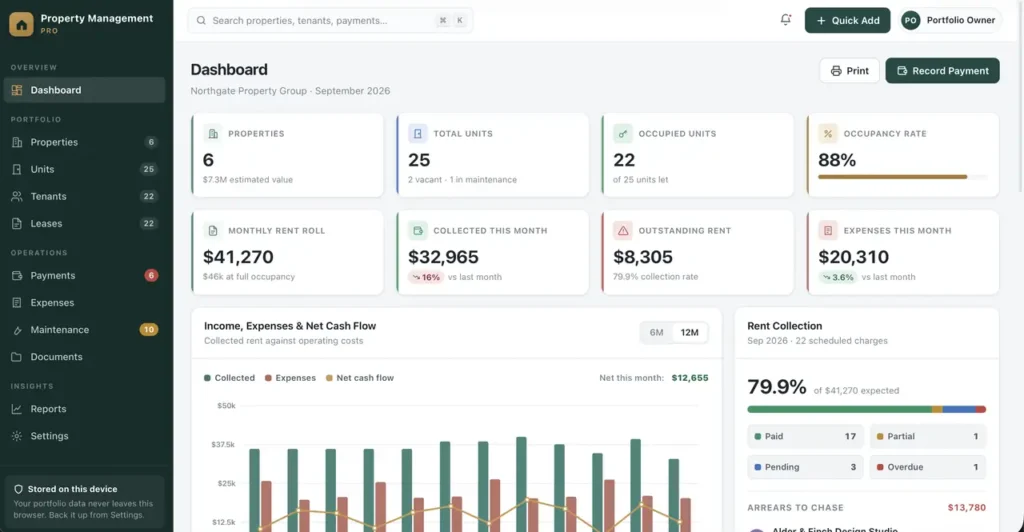
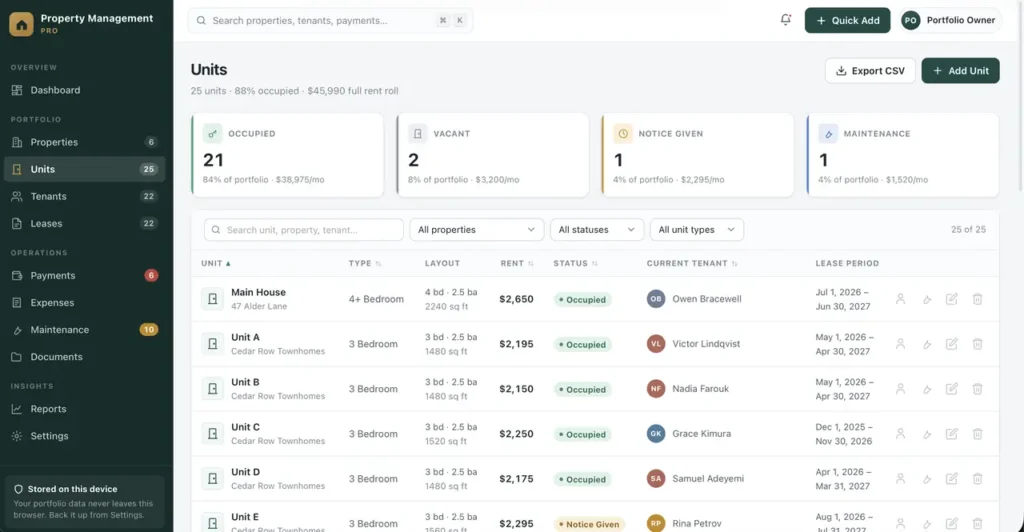
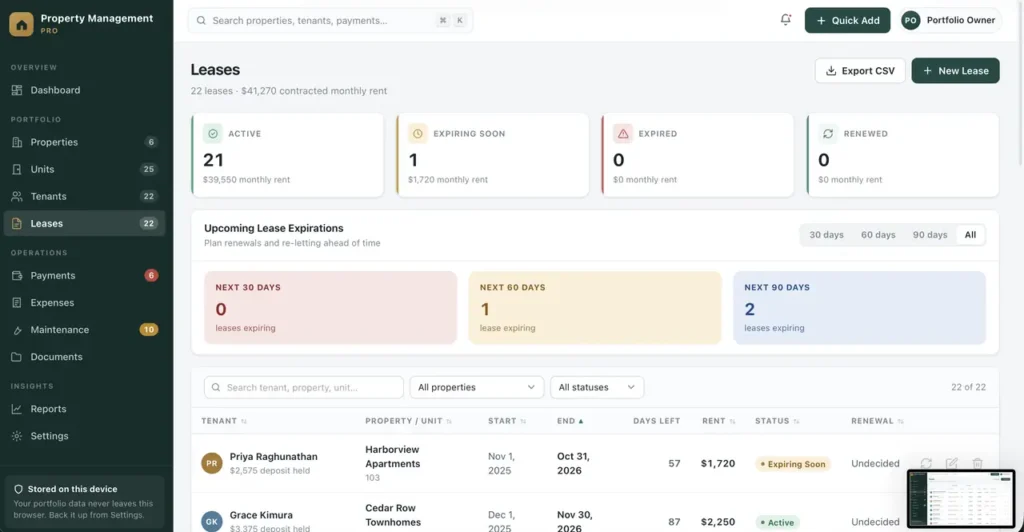
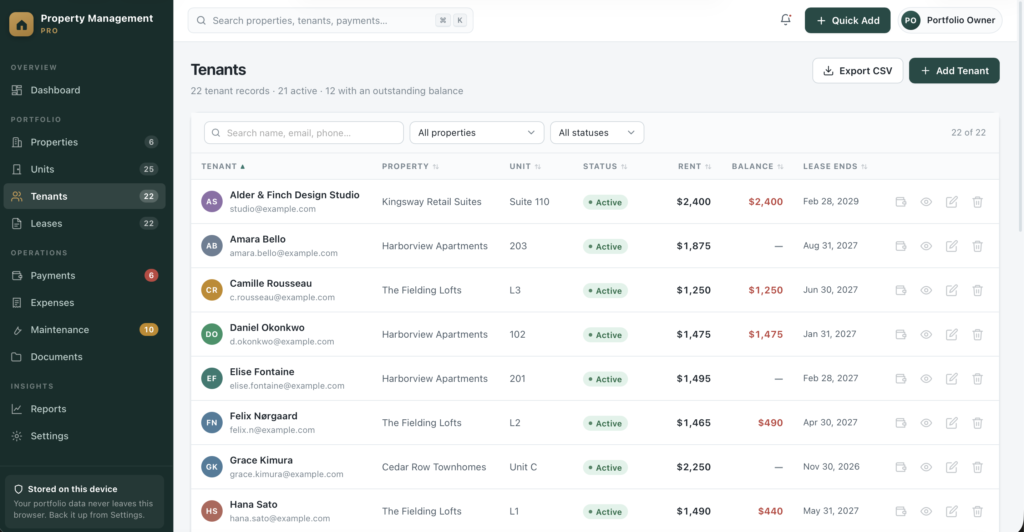
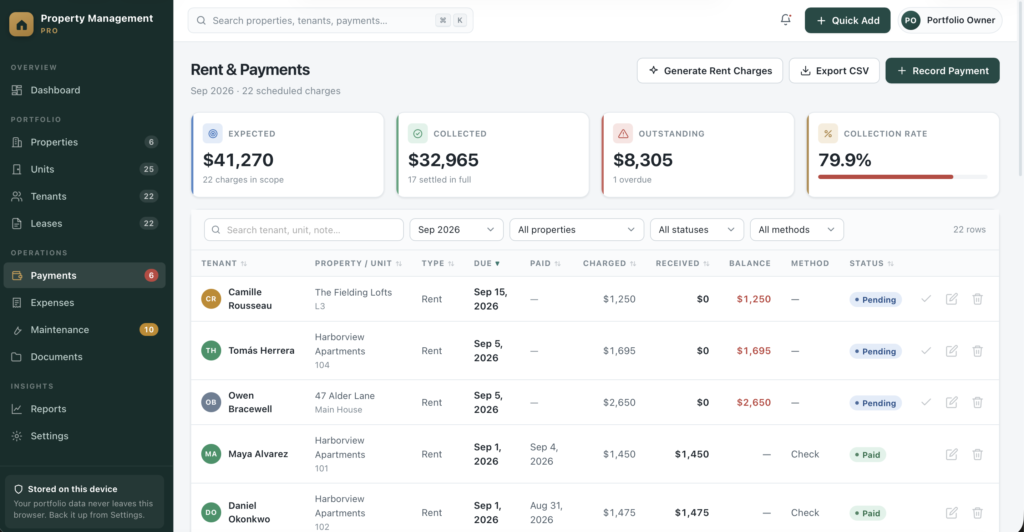
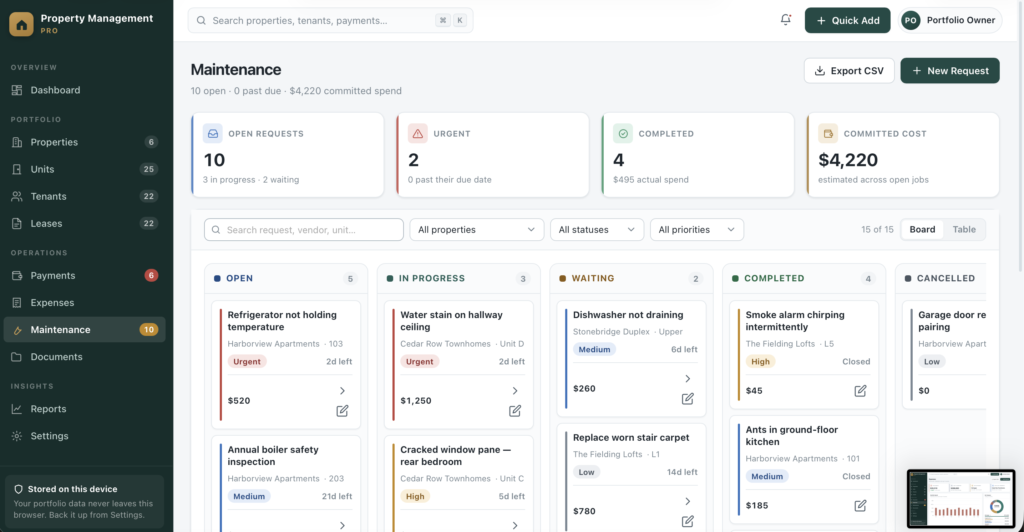
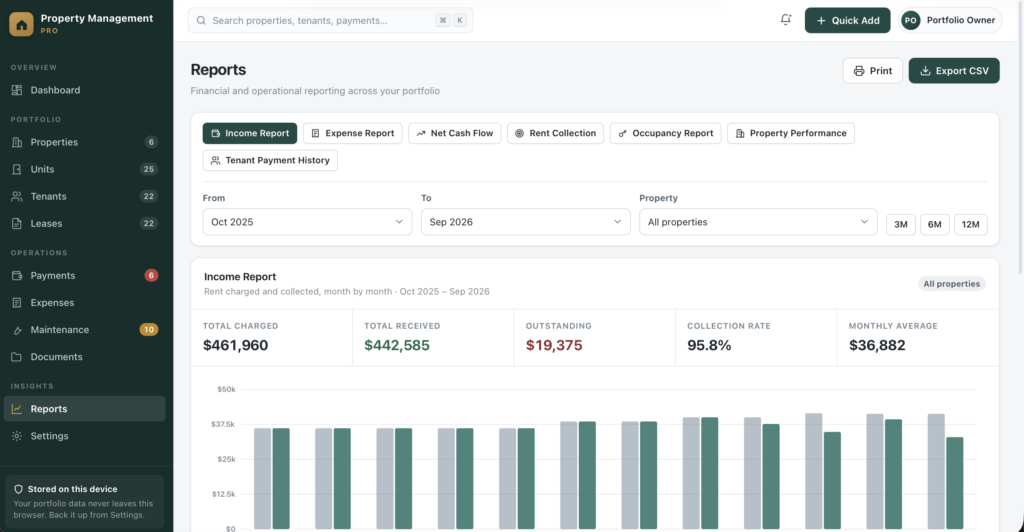
A short recording of the app, then the screens themselves.
$54
One-time purchase · yours to keep
Buy now- One payment - the file is yours to keep
- Works offline, no account, no subscription
- Your data stays on your own device
What's included
- 1 HTML file - the complete application
- 1 Getting Started guide (HTML)
- 1 License file
Delivery
Instant Download
Your files will be available to download once payment is confirmed.
Property Management Pro is a complete property management dashboard for independent landlords, small property owners, property managers and real-estate investors. It runs as a single HTML file - no installation, no account, no monthly subscription.
Everything you currently juggle across three spreadsheets, a calendar reminder and a shoebox of receipts, in one private dashboard that opens in a second.
Genuinely offline - not just "works offline-ish"
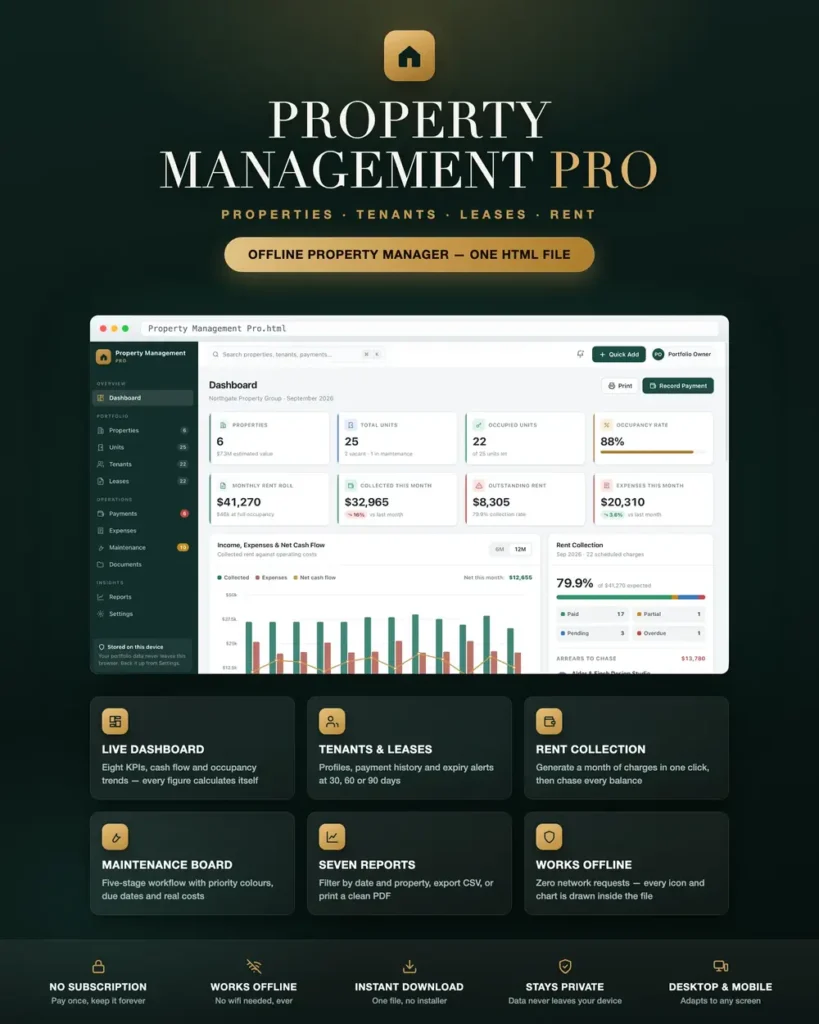
Most HTML dashboards quietly load their fonts, styling and charts from the internet, so they break the moment you lose connection. This one makes zero network requests. There is no chart library, no web font and no external asset anywhere in the file - every icon and every chart is drawn by the application itself. Open it on a plane, at a viewing with no signal, or on a computer that has never been online, and it looks and works exactly the same.
Your tenants' details never leave your machine. Nothing is uploaded anywhere, ever.
A dashboard that answers the real question
Eight live KPI cards - properties, total units, occupied units, occupancy rate, monthly rent roll, collected this month, outstanding rent and monthly expenses - with month-on-month movement.
- Collected rent, expenses and net cash flow charted together over 6 or 12 months
- Occupancy trend showing how much of your portfolio has been earning
- Rent collection breakdown across Paid, Partial, Pending and Overdue, with your live collection rate
- An "arrears to chase" panel listing exactly who owes what, oldest first
- Upcoming: lease expiries, rent due dates, maintenance deadlines and expiring documents in the next 45 days
- Recent activity so you can see what changed and when
Not one number is hard-coded. Every figure is calculated from your own records the moment you open the page.
Properties & units
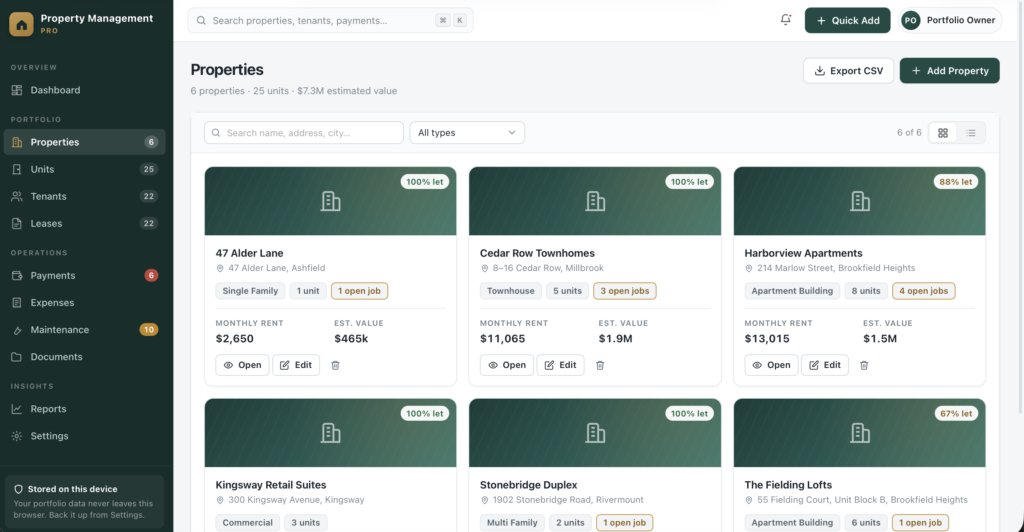
- Add unlimited properties across seven types - apartment building, single family, multi family, condo, townhouse, commercial and other
- Choose a card grid or a sortable table, and filter by type or search by name, address or city
- A full detail page for every property: units, tenants, income, expenses, occupancy, maintenance and documents, plus purchase price, current value, gain, gross yield and net yield worked out for you
- A dedicated Units module with status badges - Occupied, Vacant, Notice Given, Maintenance - showing bedrooms, bathrooms, square footage, rent, deposit, current tenant and lease dates
- Create a lease or log a repair straight from any unit row
Tenants & leases
- A complete tenant roster with outstanding balances visible at a glance
- A profile page per tenant: contact details, emergency contact, current lease, full payment history, lifetime paid, on-time payment rate, tenancy length, maintenance requests, documents and an activity timeline
- A lease tracker that works out its own status - Active, Expiring Soon, Expired, Renewed - from today's date, so nothing ever goes stale
- An "Upcoming Lease Expirations" view filtered to 30, 60 or 90 days, so renewals never sneak up on you
- One-click renewal: closes the current term, opens the next, and carries the rent across for you to adjust
Rent collection that does the arithmetic
- Record rent, partial payments, late fees, deposits and other charges, with due date, payment date, method and status
- Generate a whole month of rent charges from your active leases in one click - it skips any that already exist, so it is safe to run twice
- Mark a charge paid in full with a single button
- Expected, collected, outstanding and collection rate calculated automatically for any month you select
- Filter by month, property, status or payment method, with running totals under every filtered table
Expenses & maintenance
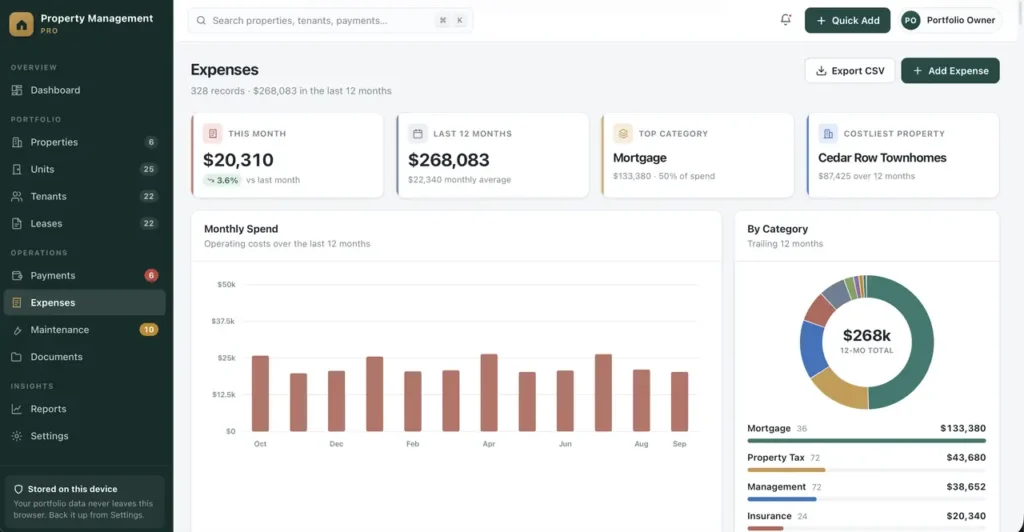
- Track costs across eleven categories including repairs, utilities, insurance, property tax, mortgage, management, cleaning and landscaping
- Monthly spend chart, category donut and per-property breakdown over the trailing twelve months
- A five-column maintenance workflow board - Open, In Progress, Waiting, Completed, Cancelled - with priority colour coding from Low to Urgent
- Every job carries a target date, vendor, estimated cost and actual cost, so you can see committed spend before the invoices land
- Move a job to the next stage with one click, from the board or the table
Documents
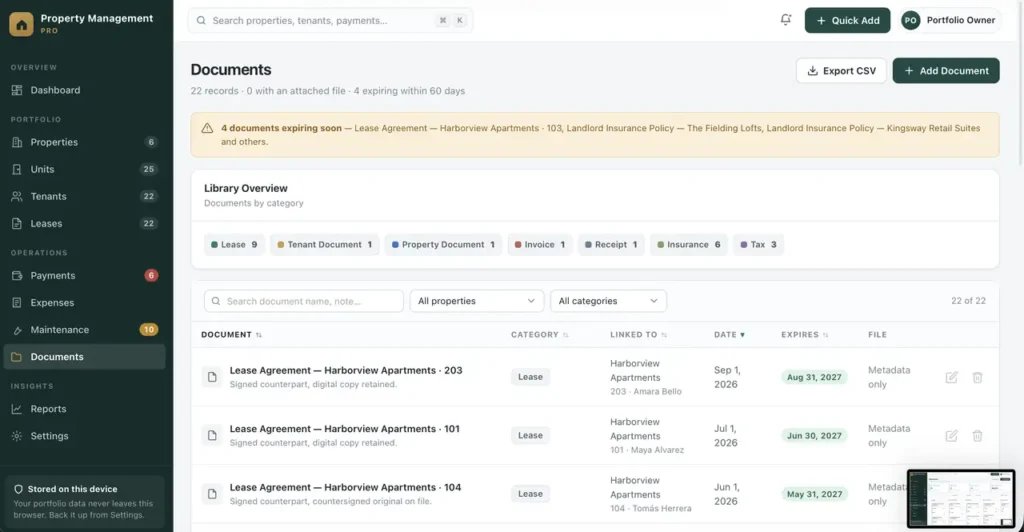
- Catalogue leases, invoices, receipts, insurance policies, tax papers and tenant documents
- Link each one to a property, unit or tenant, with document and expiry dates
- Optionally attach the file itself - stored inside the app so it opens with no internet connection and travels inside your backups
- Anything expiring within 60 days is flagged automatically on the dashboard and in notifications
Seven reports, ready to print
Income Report, Expense Report, Net Cash Flow, Rent Collection, Occupancy Report, Property Performance and Tenant Payment History - each with date-range and property filters, CSV export and a clean print layout that puts your company name and reporting period at the top. Save as PDF and send it straight to your accountant, lender or co-owner.
Built to be fast to use
- Quick Add button to create a property, unit, tenant, lease, payment, expense, maintenance job or document from anywhere
- Global search across all eight record types at once - press ⌘K or Ctrl K
- A notification bell that surfaces overdue rent, urgent repairs, expiring leases, expiring documents and vacant units
- Real form validation with clear inline messages, and a confirmation step before anything is deleted
- Esc to close, click-outside to dismiss, and keyboard focus handled properly throughout
Make it yours
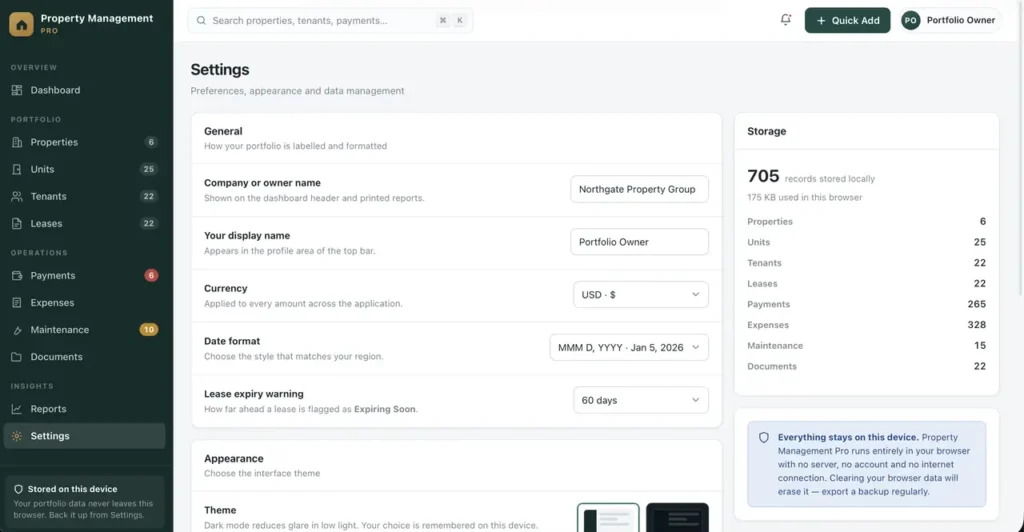
- Polished light and dark mode, remembered between sessions
- Set your company or owner name - it appears on the dashboard and on every printed report
- Twelve currencies including USD, EUR, GBP, CAD, AUD, CHF, INR and MAD, and four date formats
- Choose whether leases are flagged 30, 45, 60 or 90 days before expiry
- A restrained pine-and-brass interface built for daily use, not a spreadsheet in disguise
Your data, your control
- Records save automatically to your browser as you work
- One-click JSON export backs up everything - including attached files - and import restores it or moves you to a new computer
- Reset to the sample portfolio, or clear everything and start clean, at any time
- If your browser ever blocks storage, the app tells you immediately in plain language instead of silently losing your work
Every section is built and working
All eleven sections - Dashboard, Properties, Units, Tenants, Leases, Payments, Expenses, Maintenance, Documents, Reports and Settings - are complete and functional today, and every button in the interface does something.
Compatibility
Works in any modern browser: Chrome, Edge, Safari or Firefox. Fully responsive on desktop, laptop, tablet and phone, with a slide-out menu and a bottom navigation bar on smaller screens. Tables scroll horizontally on mobile rather than breaking the layout.
Honest limitations
Software-only disclaimer: Property Management Pro is record-keeping software only. It is not a real-estate service, brokerage service, property-management service, legal service, tax service, financial service, or investment advice.
Because this is an offline application, it does not send emails or rent reminders, take card payments, connect to your bank, run credit checks, generate legally binding lease documents, or sync between devices and people. Changing the currency updates the formatting only - it does not convert amounts. All figures come from what you enter yourself. This is a portfolio organisation tool, not accounting, tax, legal or investment advice, and it does not check compliance with landlord-tenant law in your jurisdiction.
Records are stored in your own browser, so export a backup regularly and keep it somewhere safe.
This is a digital download - no physical item will be shipped. Change-of-mind purchases are final once the file has been delivered; faulty or misdescribed files are covered by the refund policy.
Frequently asked questions
Do I need an internet connection?
Only to download the file. It makes zero network requests after that - every chart and icon is drawn by the application itself, with no external asset anywhere in the file.
Are all eleven sections actually working?
Yes. Dashboard, Properties, Units, Tenants, Leases, Payments, Expenses, Maintenance, Documents, Reports and Settings are complete today - there are no placeholder pages.
How do lease statuses stay up to date?
Active, Expiring Soon, Expired and Renewed are worked out from today’s date automatically, so nothing goes stale on its own.
Can it collect rent or send reminders for me?
No. It does not take card payments, connect to your bank or send emails. You record what you collect, and the dashboard shows who owes what, oldest first.
Can I attach lease and insurance documents?
Yes. Documents can be linked to a property, unit or tenant, and the file itself can optionally be attached - it then travels inside your JSON backups.
Where are my tenants’ records stored?
In your own browser, on your own device. Nothing is uploaded anywhere. Export a JSON backup regularly and keep it somewhere safe.
Is it a subscription?
No. You pay once and the file is yours.
At a glance
How it runs
-
1
Download
You get the application as one HTML file, with its documentation guide and its licence.
-
2
Open
Double-click it. It opens in the browser you already have - Chrome, Edge, Safari or Firefox. There is nothing to install and no account to create.
-
3
Keep
Your records save to that browser on that device. Export a backup from the app whenever you want a copy of your own.