

Study & Exam Planner Plus
For students planning a whole term.
Subjects, exams, assignments and where your study hours really go.
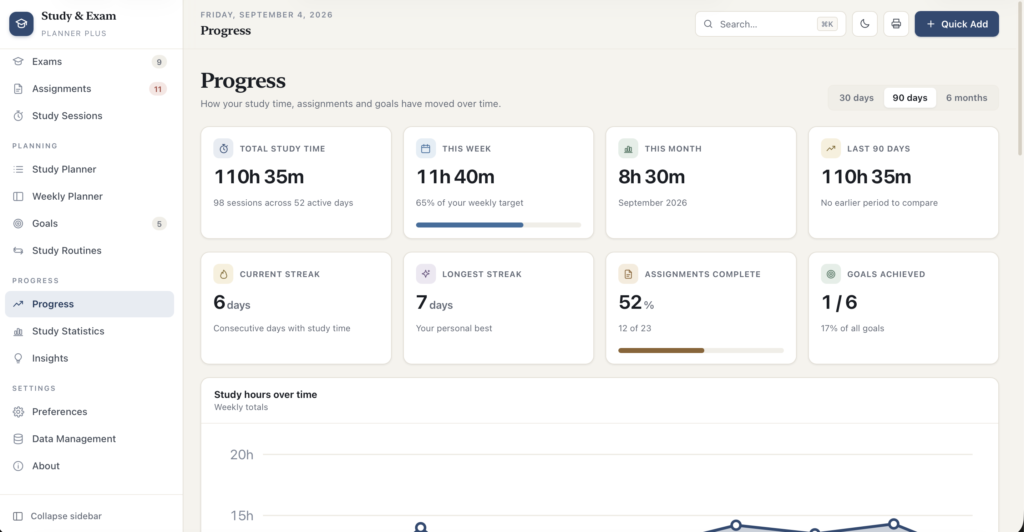
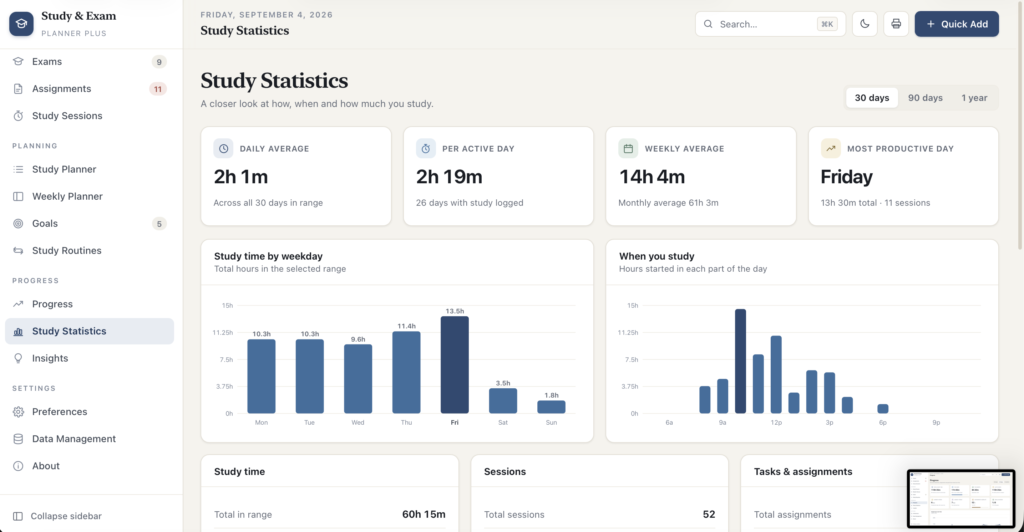
A short recording of the app, then the screens themselves.
$32.50
One-time purchase · yours to keep
Buy now- One payment - the file is yours to keep
- Works offline, no account, no subscription
- Your data stays on your own device
What's included
- 1 HTML file - the complete application
- 1 Getting Started guide (HTML)
- 1 License file
Delivery
Instant Download
Your files will be available to download once payment is confirmed.
Study & Exam Planner Plus is a complete planning desk for a student term. It runs from a single file in your browser - no installation, no account, no monthly subscription, and no data leaving your device.
Most students do not fail to plan because they lack a calendar. They lose track because the plan lives in five places: the exam dates in an email, the deadlines on a whiteboard, the reading in a notebook, the actual hours studied nowhere at all. This pulls the whole term into one place and - crucially - records what you really did, so the plan and the reality can be compared.
Genuinely offline - not just "works offline-ish"
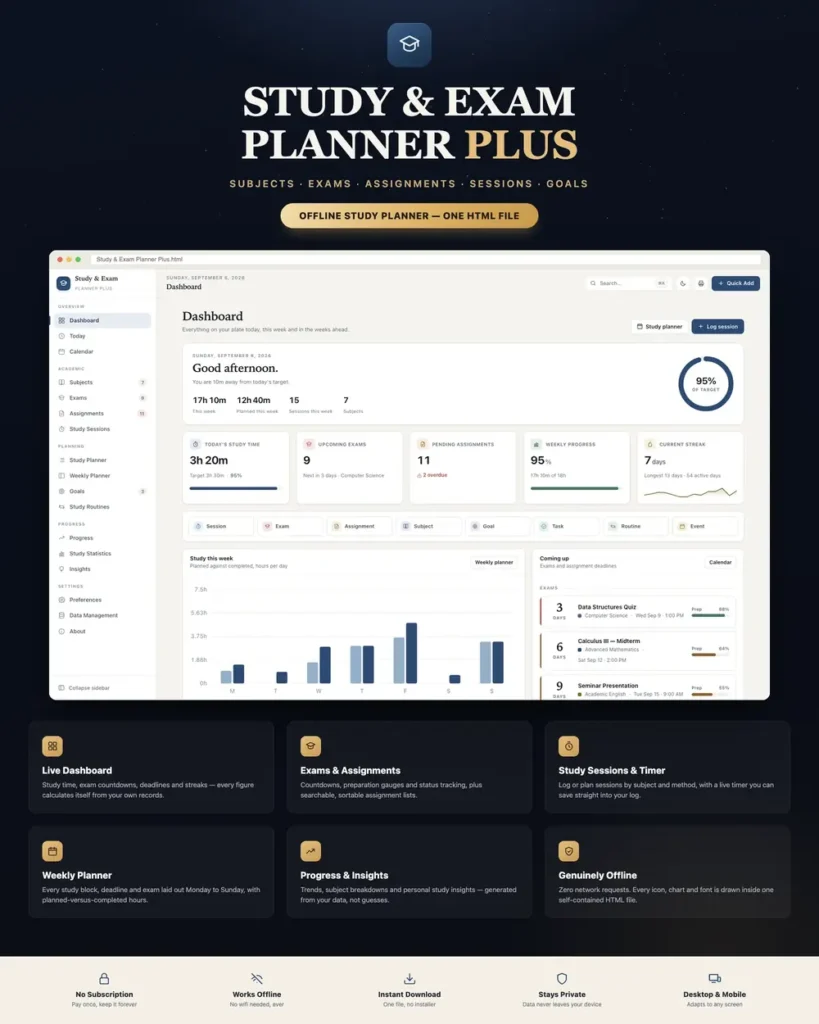
Most HTML dashboards quietly load their fonts, icons and charts from the internet, so they break the moment you lose connection. This one makes zero network requests. There is no chart library, no web font, no CDN link and no external asset anywhere - all 52 icons and all eight chart types are drawn by the application itself in inline SVG. Open it in a library basement, on a train, or on a laptop that has never been online, and it looks and behaves exactly the same.
Your grades, deadlines and study habits are nobody else's business. Nothing is uploaded anywhere, ever, and there is no account for anyone to breach.
A dashboard that answers the real question
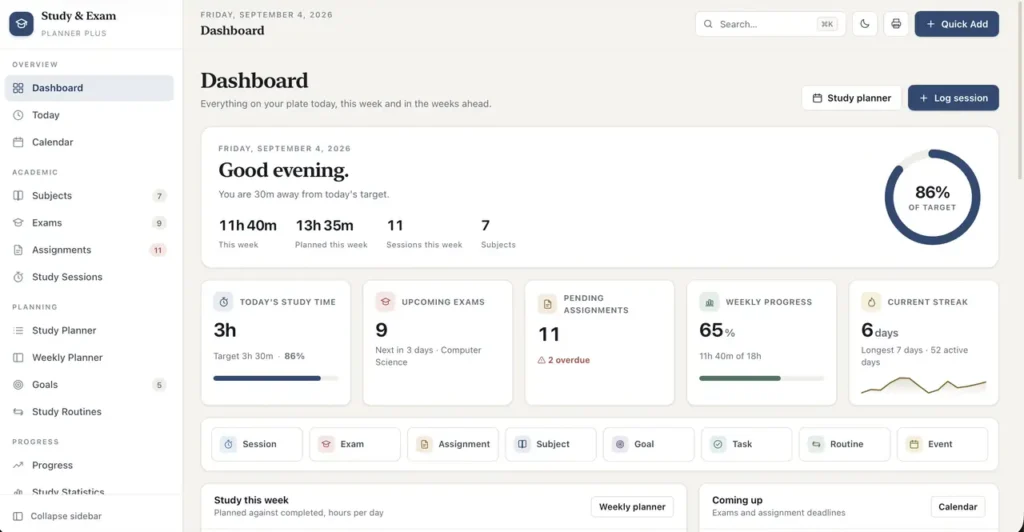
A greeting header with today's target ring, then five headline cards - today's study time, upcoming exams, pending assignments, weekly progress and your current streak - each with the context that makes the number mean something.
- Planned versus completed study hours, day by day across the week
- Today's schedule: classes, study blocks, deadlines, exams and tasks in time order
- Exam countdowns with live preparation gauges
- Study time by subject over the last 30 days
- Assignment completion as a donut, split by status
- Active goal progress
- Three personal study insights generated from your own records
- A one-row quick-action strip: session, exam, assignment, subject, goal, task, routine, event
Not one figure is hard-coded. Every number is calculated from your own records the moment you open the page.
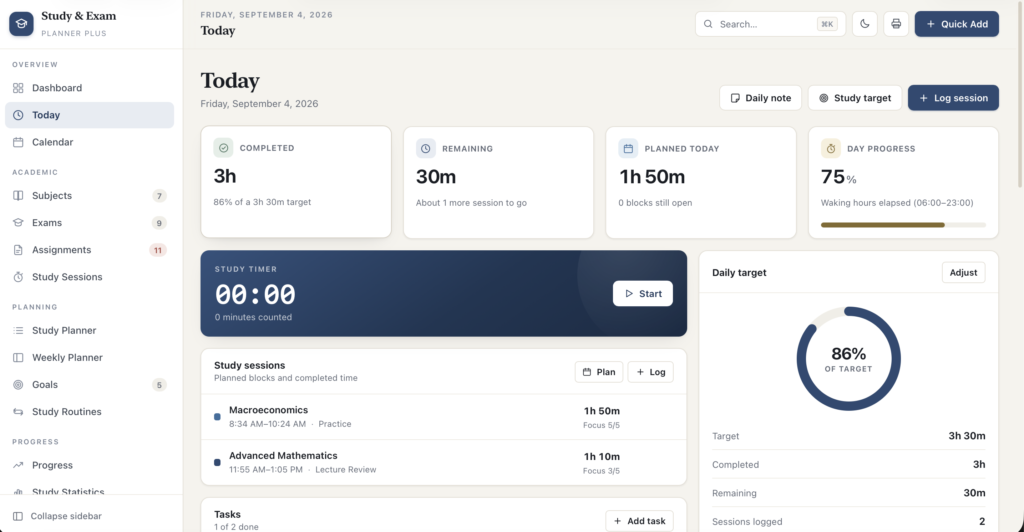
Today - a daily command centre
- Completed, remaining and planned time, plus a day-progress meter
- A live study timer that keeps counting across a page refresh and saves straight into a logged session
- Today's study sessions, both the blocks you planned and the time you actually put in
- Tasks with one-tap completion
- Deadlines split into overdue, due today, and the next seven days
- A daily target ring you can adjust for just that day
- Exam countdowns for the nearest assessments
- Today's routines as tickable checklists
- Goals whose window covers today, and a free-text daily note
Calendar - month, week and day
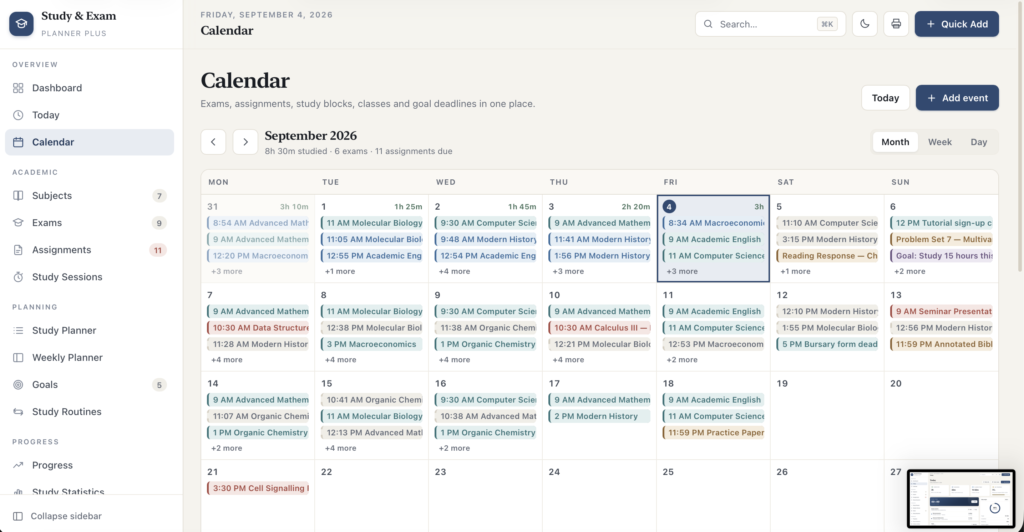
Every kind of record on one grid: exams, assignment due dates, completed sessions, planned blocks, classes, events, goal deadlines and tasks, each with its own quiet colour. Navigate by month, week or day, jump back to today, click any date for a full detail list, or click an empty slot to plan a study block right there. On a phone the month grid switches to colour bars with the detail list underneath, so it stays readable instead of turning into truncated text.
Subjects
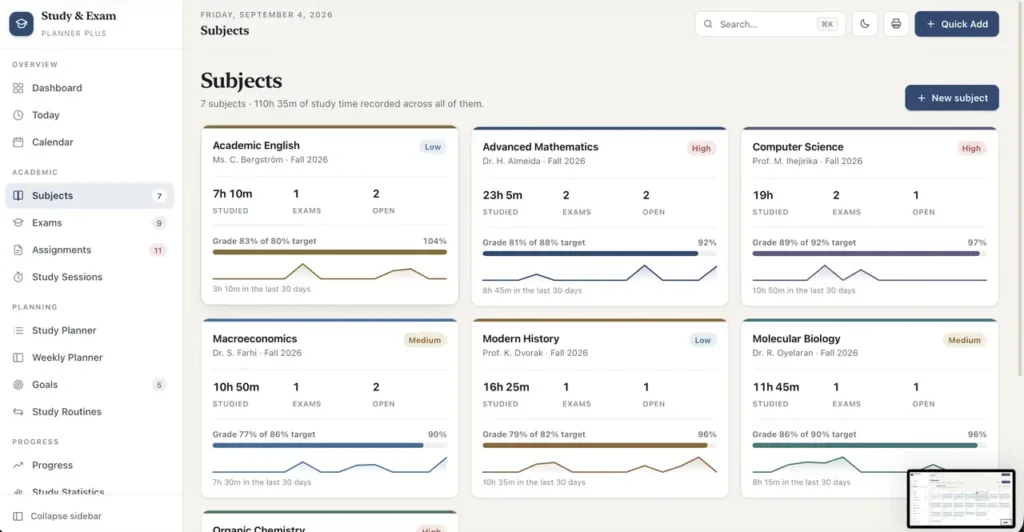
- Name, teacher, colour, description, semester, priority, current grade and target grade
- Each card shows hours studied, exam and open-assignment counts, grade progress and a 14-day sparkline
- Open a subject for its own page: eight-week hours chart, upcoming exams, open assignments, a grade-progress ring, a study-method breakdown, and tabbed lists of every exam, assignment and session attached to it
- Every statistic in the app can be read per subject
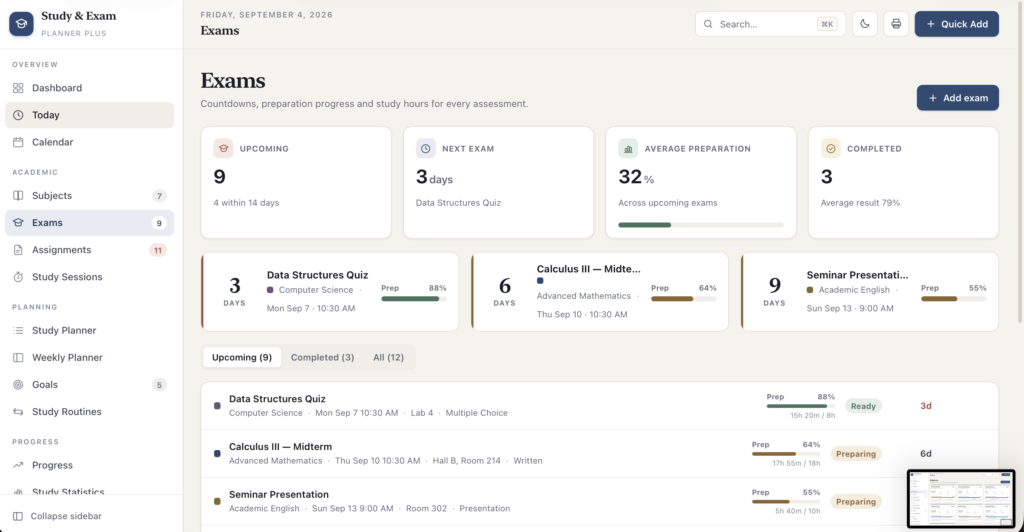
Exams - countdowns that mean something
- Name, subject, date, time, location, type, perceived difficulty, planned study hours and notes
- A preparation slider you move as you revise, and a status the app works out for you: Upcoming → Preparing → Ready → Completed
- Days remaining, and the study hours you have actually logged against that subject measured against the hours you planned
- Attractive countdown cards on the dashboard, the Today page and the exam list
- Record the result after the exam and see your average across completed assessments
Assignments
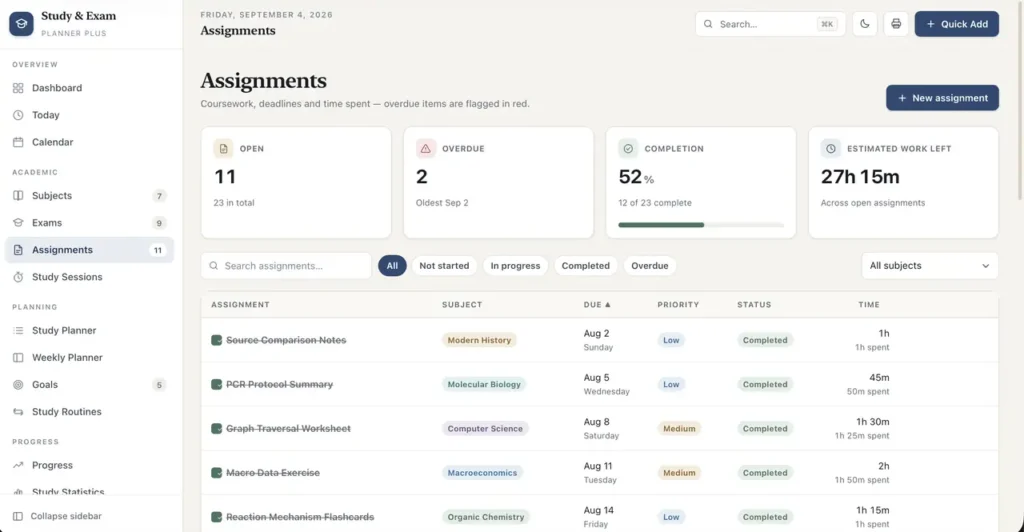
- Title, subject, description, due date and time, priority, status, estimated time, time actually spent and notes
- Three statuses - Not Started, In Progress, Completed - cycled with a single click on the checkbox
- Overdue work is flagged with a red rail and pulled to the top of the Today page, so nothing quietly slips
- Full-text search, status filters including an overdue filter, subject filter, and six sortable columns
- Duplicate a recurring assignment instead of retyping it
- Headline figures for open work, overdue count, completion rate and estimated hours still to do
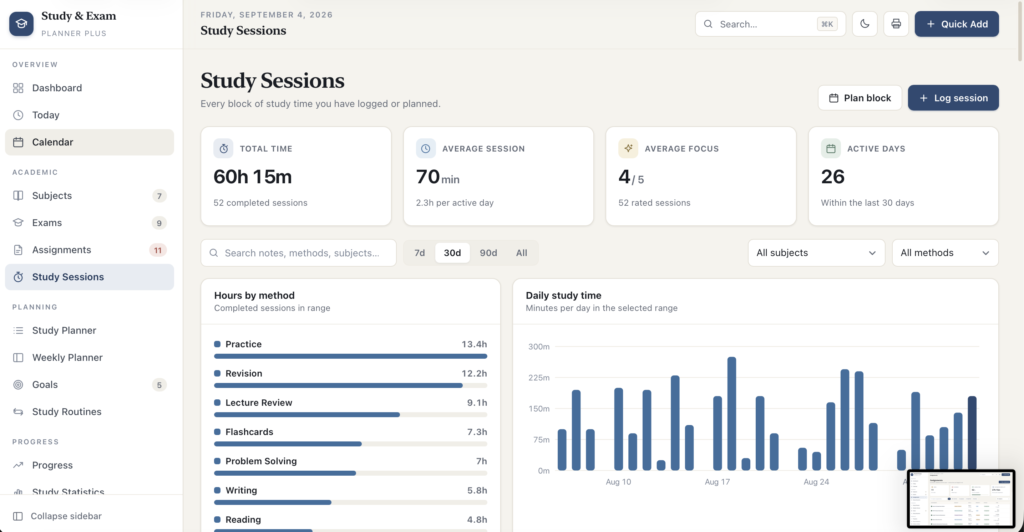
Study sessions
- Date, subject, start time, duration, study method, focus rating and notes
- Eight methods built in: Reading, Practice, Flashcards, Problem Solving, Revision, Writing, Lecture Review and Group Study
- Sessions are either completed time or planned blocks - mark a planned block done in one click and it joins your totals
- Search, range presets of 7, 30 or 90 days or everything, subject and method filters, sortable columns
- Hours by method and daily minutes charted alongside the log
Study planner & weekly planner
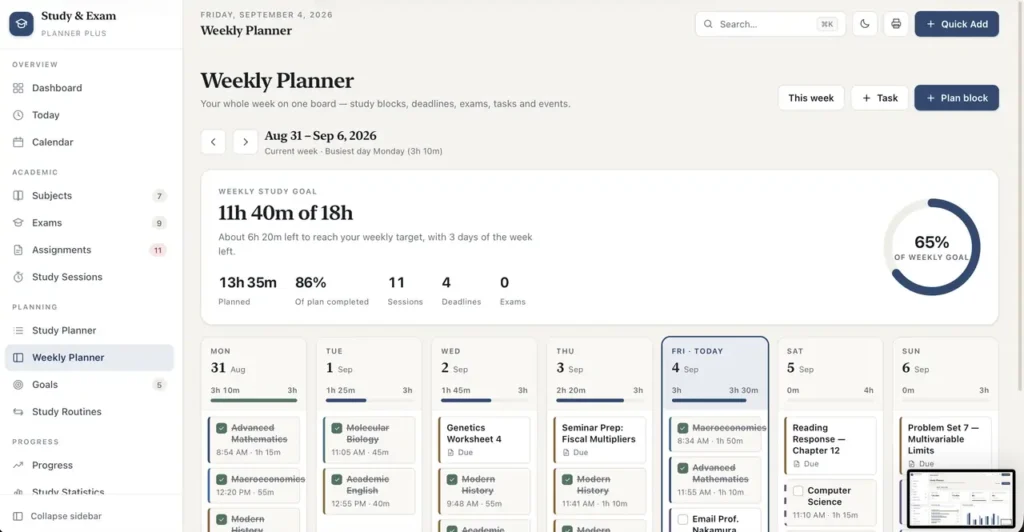
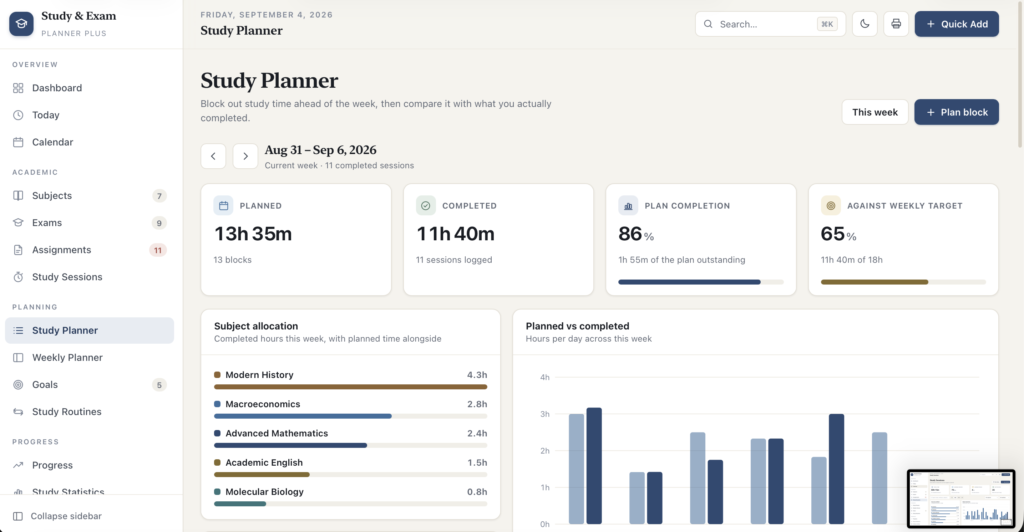
Two planning views that do different jobs. The Study Planner blocks out the week ahead and then holds it to account: planned hours, completed hours, plan-completion percentage and progress against your weekly target, subject allocation, a planned-versus-completed chart, and a per-day card with its own target meter. Its Revision Focus panel lists every exam in the next few weeks with the planned study hours still outstanding, and creates a revision block for it in one click. The Weekly Planner is the board you look at on a Sunday evening: Monday to Sunday, each column carrying that day's exams, deadlines, study blocks, tasks and events, with a daily target meter and an Add block button. Above it, a weekly study goal with a progress ring and five summary figures.
Goals that score themselves
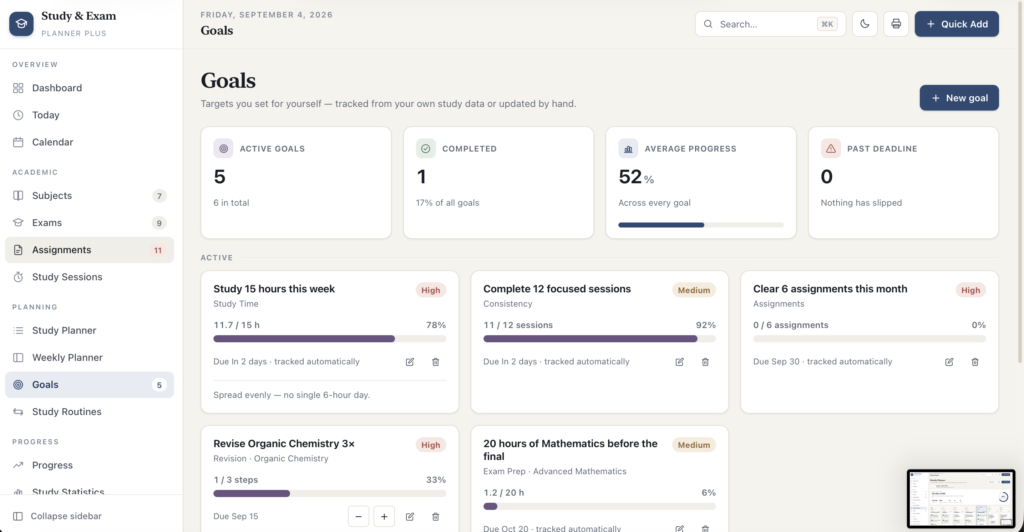
Set a target - fifteen hours this week, twelve focused sessions, six assignments cleared this month, twenty hours of maths before the final - and choose how it is measured. Goals tracked by study time, sessions completed or assignments completed are scored automatically from records you already keep, so there is nothing to tick off twice. Goals that cannot be measured that way get simple plus and minus controls. Each shows progress, percentage, deadline and status, grouped into Active, Past deadline and Completed.
Study routines
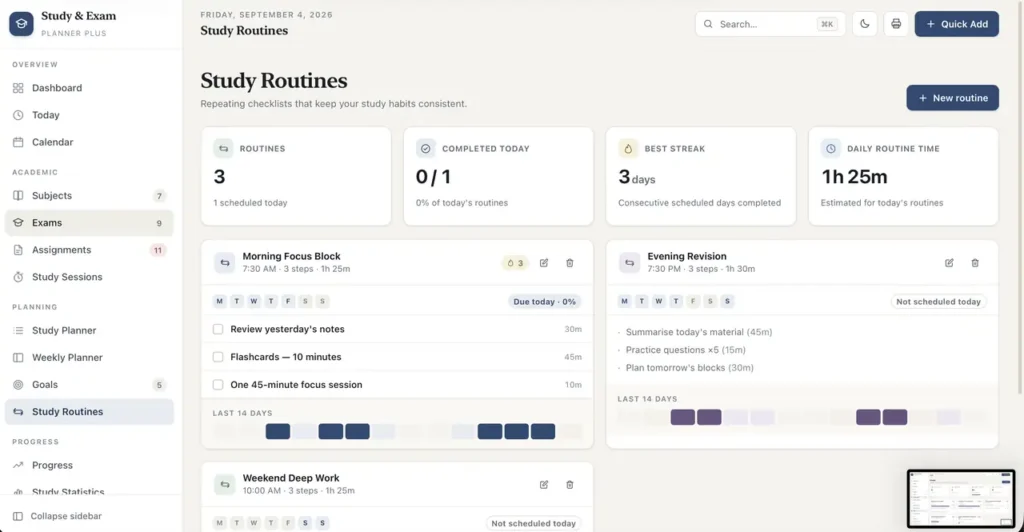
Repeating checklists for the habits that hold a term together - a morning review, an evening revision block, a weekend deep-work session. Set the time, the weekdays, a colour and any number of steps with estimated minutes. Ticking steps is logged per day, which drives a completion percentage, a consecutive-day streak and a 14-day history strip for each routine.
Progress & study statistics
Two analytics pages that stay readable. Progress covers total, weekly, monthly and range study time with a period-over-period comparison, current and longest streak, assignment and goal completion, a weekly-hours trend line, daily bars, hours by subject, planned versus completed, assignments completed per week, and a six-month study heatmap with month and weekday labels. Study Statistics goes finer: daily, weekly and monthly averages, time per active day, your most productive weekday, your busiest start time, a when-you-study histogram, and four detail panels covering study time, sessions, tasks and assignments, and exams - plus a study-method table with time, session count, average focus rating and share of your hours.
Personal study insights, written in plain english
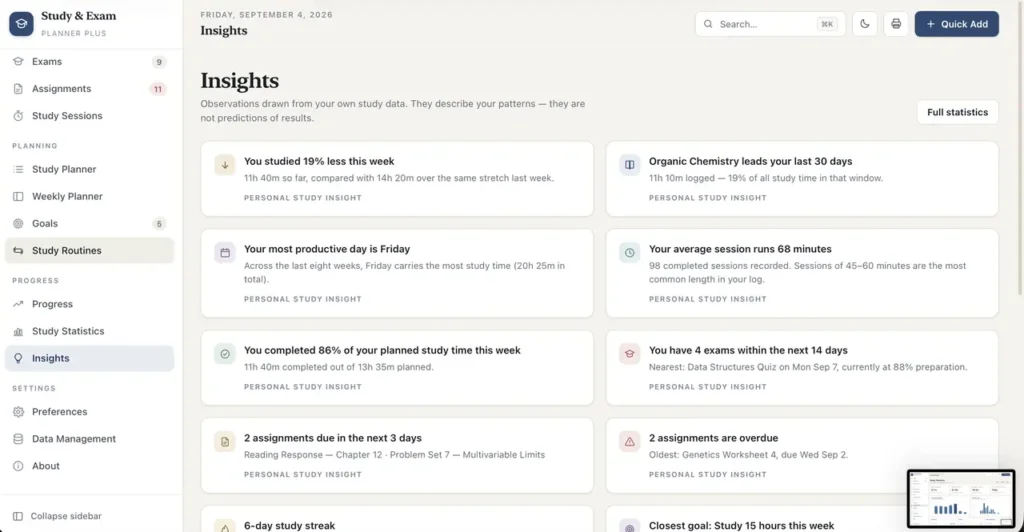
The app reads your records and writes out what it sees: "You studied 19% less this week than last." "Organic Chemistry leads your last 30 days." "Your most productive study day is Friday." "Your average session runs 68 minutes." "You have 4 exams within the next 14 days." "Lecture Review gives you your best focus ratings." Every one is clearly labelled as a personal study insight, and the Insights page explains exactly how each is calculated. They describe your patterns. They do not predict grades, and the product never claims otherwise.
Built to be fast to use
- Quick Add from anywhere - session, exam, assignment, subject, goal, routine or event
- Global search across subjects, exams, assignments, sessions, goals, routines, classes, tasks and daily notes; press / or Ctrl/⌘ K
- Keyboard shortcuts throughout: N for a new session, Shift D for dark mode, G then a letter to jump to any page, Esc to close
- Delete from any edit dialog, so no record is trapped on one screen
- Undo on delete - a toast puts the record back exactly where it was
- A confirmation step before anything destructive, and clear inline validation on every form
- Toast confirmations, smooth modals, chart tooltips and keyboard focus handled properly throughout
Make it yours
- A calm parchment-and-navy interface with serif headings - an academic desk, not a spreadsheet in disguise
- A genuinely designed dark mode: a separate palette, not an inversion, remembered between sessions
- Week starting Monday or Sunday, your own daily and weekly study targets, default session length, your name in the greeting, and which page opens first
- Eight subject colours used consistently across every chart, badge and calendar entry
- Every colour is a CSS variable at the top of one stylesheet, so rebranding takes minutes
Prints properly
Every page has a dedicated print stylesheet. The sidebar, toolbars and buttons drop away, headings and charts stay, and each page is stamped with the product name and date - so a weekly plan or an exam list can go on a wall or into a folder as a clean sheet of paper.
Your data, your control
- Records save automatically to your browser as you work
- One-click JSON backup containing every record and every preference
- Import with a choice of merging or replacing; on a merge, clashing identifiers are re-issued so an accidental double import never overwrites what you already have
- Six separate CSV exports - study sessions, assignments, exams, subjects, goals and a summary sheet - with the calculated columns included
- Remove the sample data in one step, keeping your preferences
- Erase everything, behind an explicit confirmation
- If your browser ever blocks storage, the app says so immediately in plain language instead of silently losing your work
Every section is built and working
All seventeen pages - Dashboard, Today, Calendar, Subjects, Exams, Assignments, Study Sessions, Study Planner, Weekly Planner, Goals, Study Routines, Progress, Study Statistics, Insights, Preferences, Data Management and About - plus the per-subject detail page are complete and functional today, and every button in the interface does something.
Compatibility
Works in any modern browser: Chrome, Edge, Brave, Safari 15.4+ or Firefox 100+, on macOS, Windows, iOS and Android. Fully responsive from phone to ultrawide - the sidebar becomes a slide-out drawer with a bottom navigation bar, tables scroll cleanly, the calendar adapts, and every control is touch-sized.
Honest limitations
Because this is an offline application, it does not connect to Google Classroom, Canvas, Moodle or any other LMS, import a timetable automatically, send reminders or notifications, or sync between devices and people. You enter your own records; that is the point, and it is also the work. Every figure comes from what you enter.
It is a planner and a study log, not a note-taking app or a flashcard app - there is no rich-text editor and no spaced-repetition engine. Grades are values you type in rather than a weighted calculation from your assessments.
The insight cards describe patterns in the data you have entered. They are not predictions, and nothing in this product claims that a study pattern guarantees an exam result.
Records are stored in your own browser, so export a backup regularly and keep it somewhere safe. Clearing your browser's site data will remove them, and nobody can recover them for you.
This is a digital download - no physical item will be shipped. Change-of-mind purchases are final once the file has been delivered; faulty or misdescribed files are covered by the refund policy.
Questions
Do I need an internet connection?
Only to download it. After that it never touches the network again.
Do I need to install anything?
No. It is one HTML file - double-click it and it opens in the browser you already have.
Where is my data stored?
In your own browser's local storage, on your own device. There is no server and no account. Export a JSON backup from Data Management whenever you want a copy you control.
Does it sync between my laptop and my phone?
No - there is no server to sync through. You can move a snapshot across with the JSON export and import.
Can it import my timetable or my university's assignment list?
Not in this version. Subjects, classes, exams and assignments are entered by hand.
Will it calculate my final grade from my assessment weightings?
No. Current and target grades are values you enter yourself, and the app shows your progress between them.
Can I remove the sample data?
Yes, in one step from Data Management. Your preferences are kept.
Can I change the colours and branding?
Yes. The whole palette is a set of CSS variables at the top of the stylesheet, and the name, logo and text are plain HTML.
Does it work on a phone?
Yes. There is a dedicated mobile layout with a bottom navigation bar, a slide-out menu, and a calendar that adapts to a narrow screen.
At a glance
How it runs
-
1
Download
You get the application as one HTML file, with its documentation guide and its licence.
-
2
Open
Double-click it. It opens in the browser you already have - Chrome, Edge, Safari or Firefox. There is nothing to install and no account to create.
-
3
Keep
Your records save to that browser on that device. Export a backup from the app whenever you want a copy of your own.


