

BudgetPilot Pro
For households who want a clear monthly plan without a bank login.
The 50/30/20 split, bills, savings goals and a debt payoff plan, in one offline budget.





A short recording of the app, then the screens themselves.
$35
One-time purchase · yours to keep
Buy now- One payment - the file is yours to keep
- Works offline, no account, no subscription
- Your data stays on your own device
What's included
- 1 HTML file: the complete BudgetPilot Pro application
- 1 Getting Started guide (HTML)
- 1 License file (HTML)
Delivery
Instant Download
Your files will be available to download once payment is confirmed.
Every dollar, already decided.
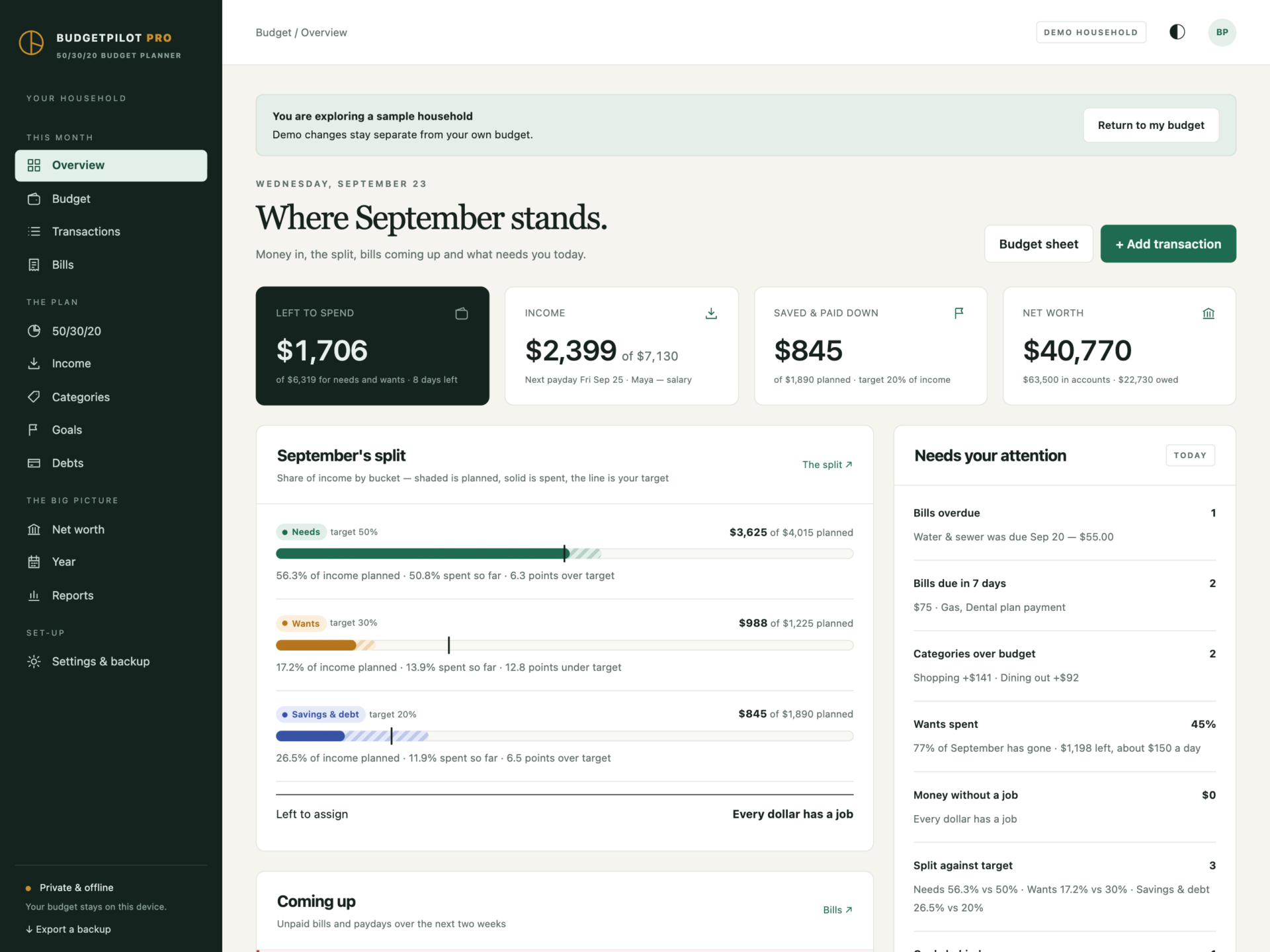
BudgetPilot Pro is a 50/30/20 budget planner for households who want a clear monthly plan without handing their bank login to an app or paying for one every year. The monthly budget, the needs-wants-savings split, bills, savings goals, the debt payoff plan, the year view and net worth live in one offline file that keeps your numbers on your own computer.
Download the HTML app, open it in your browser and set up your budget, or explore the sample household first: two salaries - one every two weeks, one monthly - plus freelance income, 21 categories, 18 bills, three savings goals, four debts, five accounts and six months of transactions.
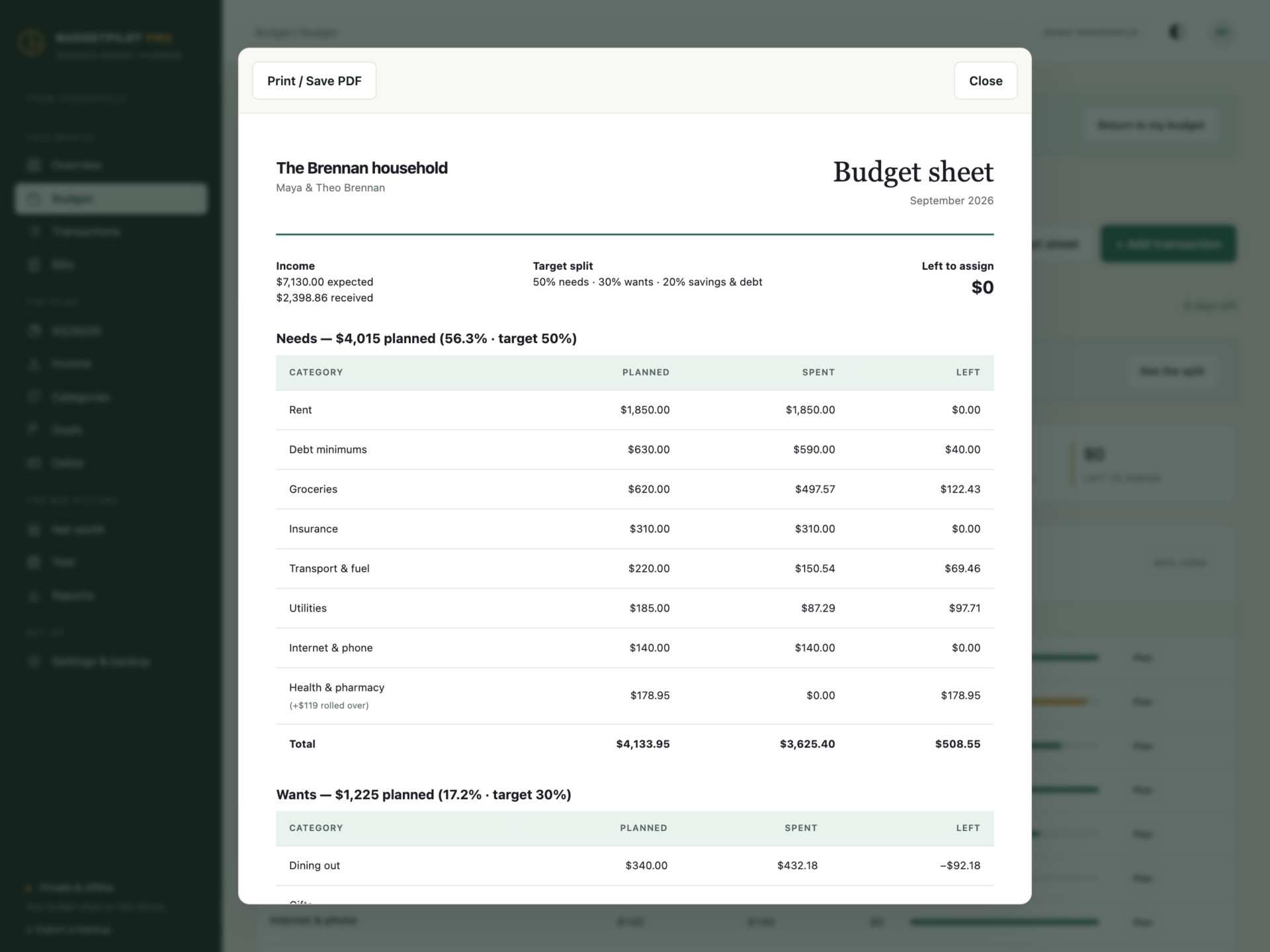
Every dollar has a job
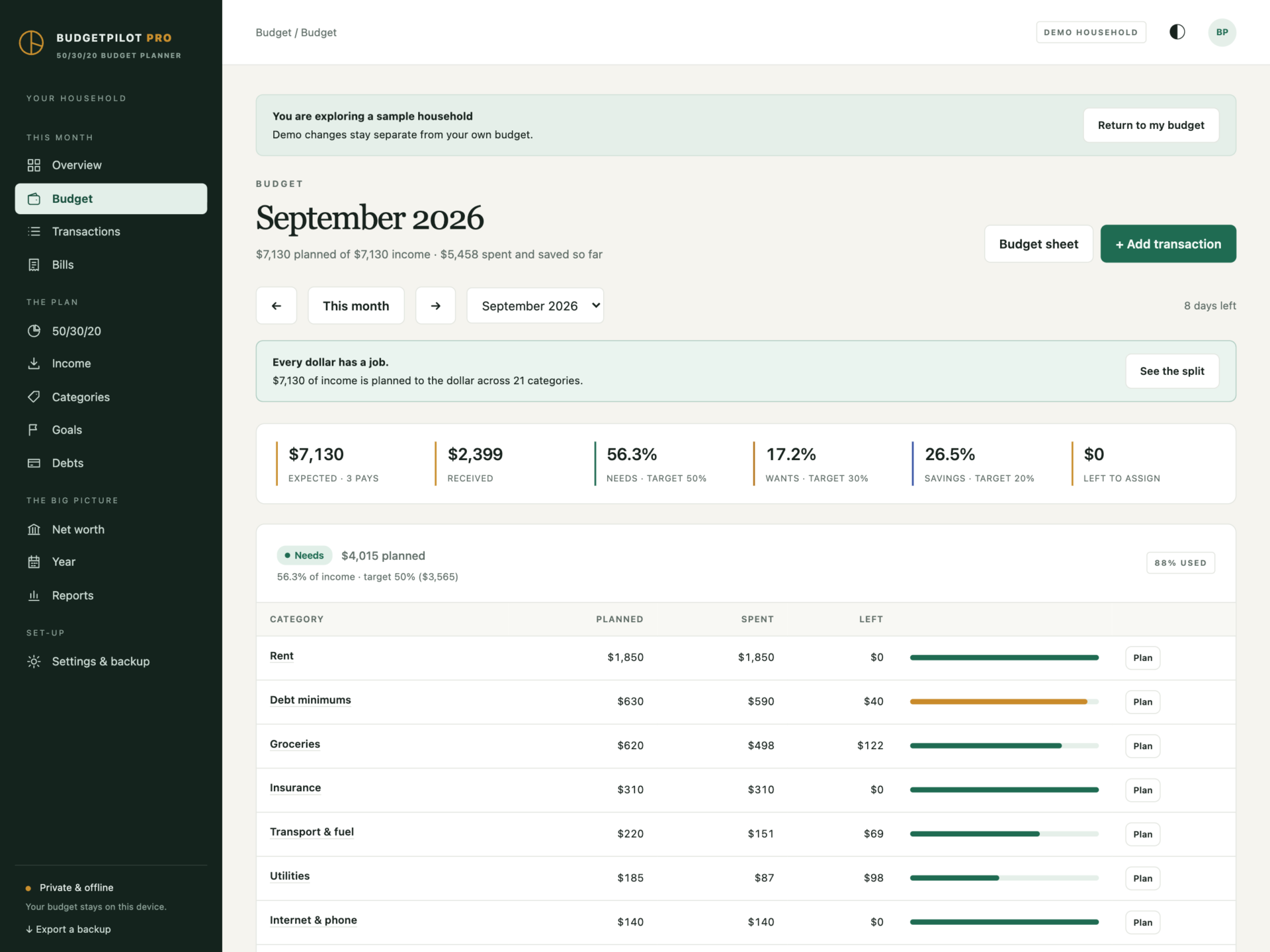
- A monthly budget bucket by bucket: planned, spent and left for every category.
- Left to assign counts down to zero, so every dollar of income gets a job.
- Change one month without touching the usual amount, and put it back with one click.
- Categories that roll over carry what is left - or overspent - into next month, for gifts, trips and anything irregular.
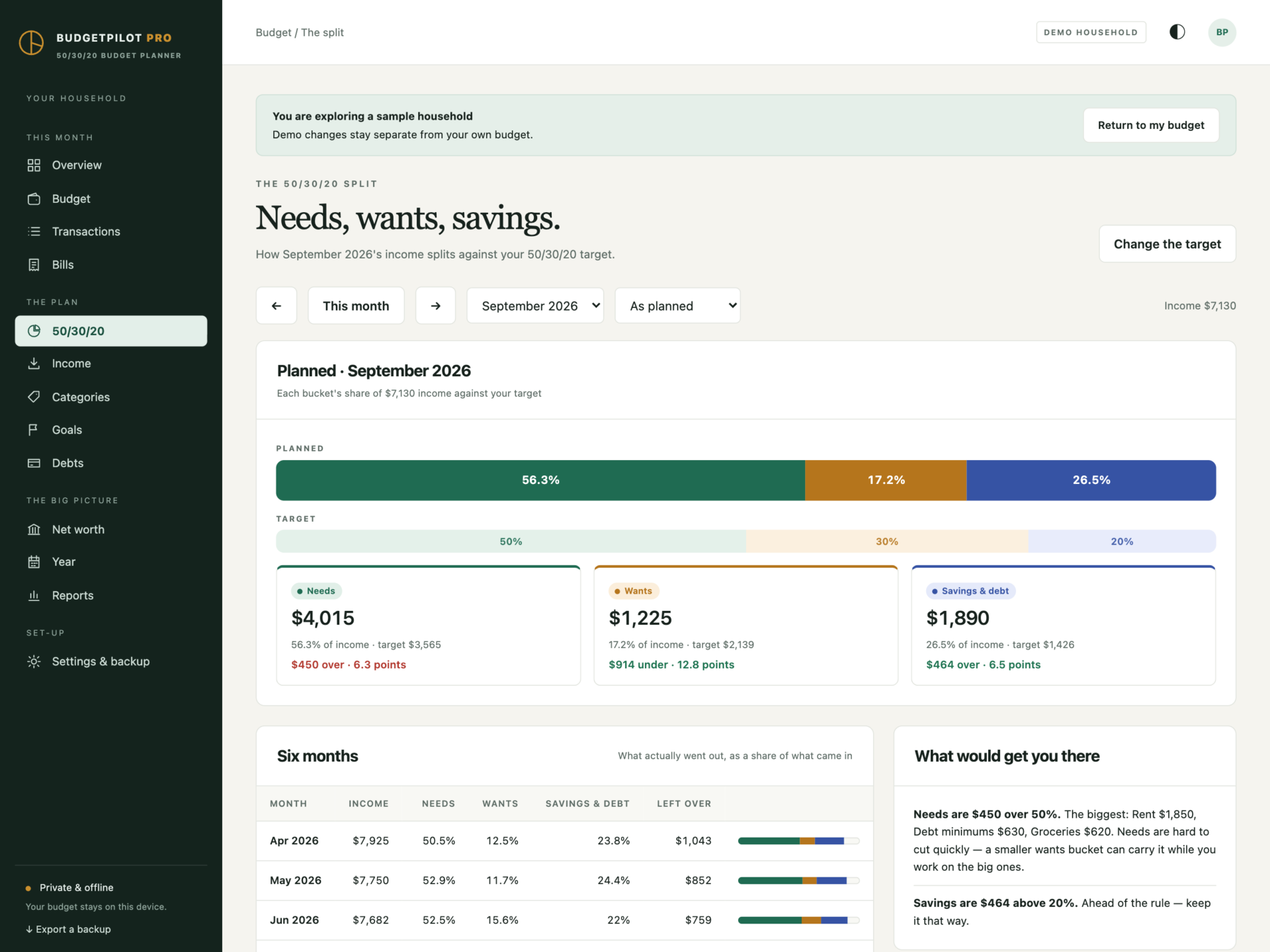
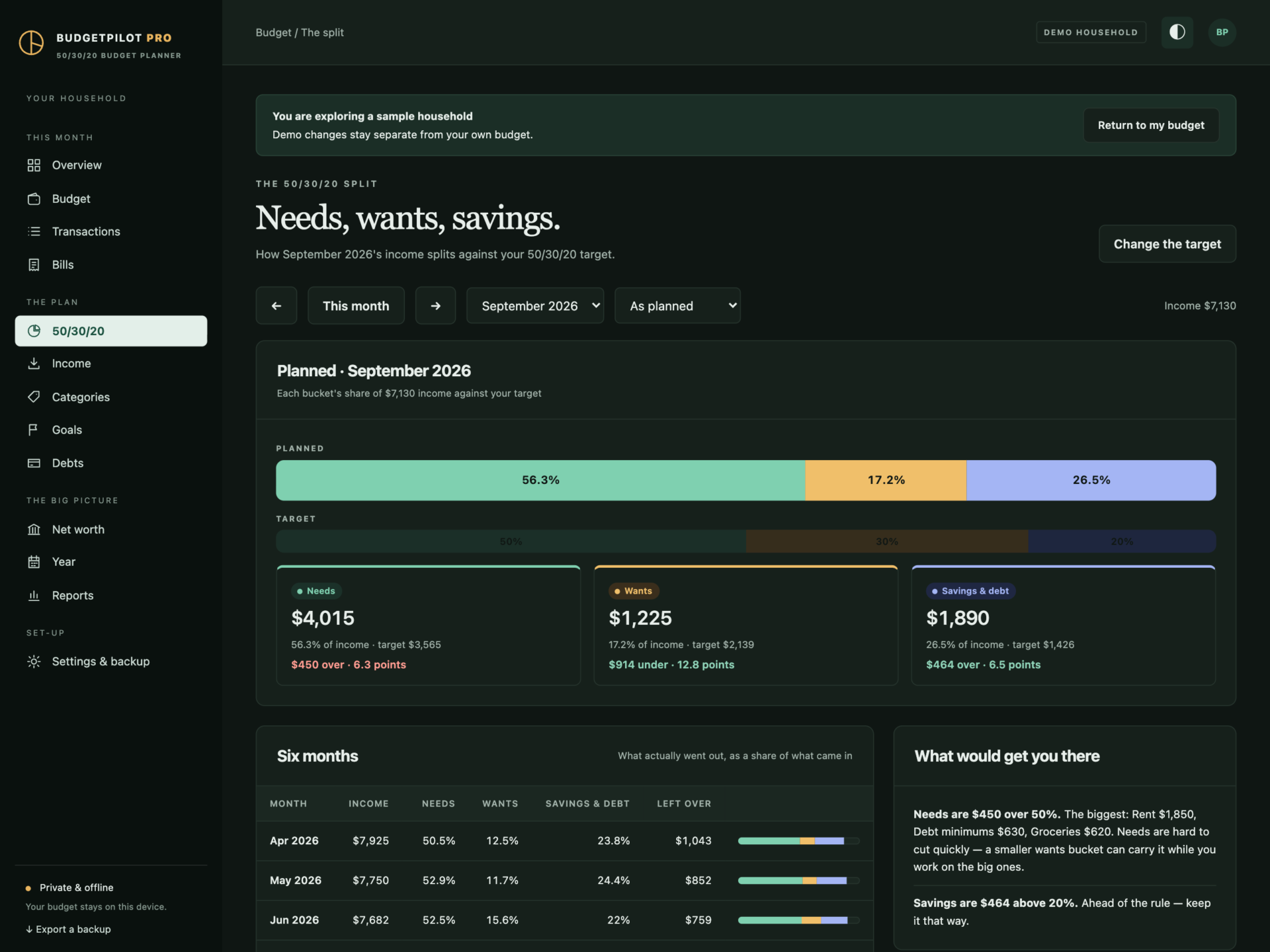
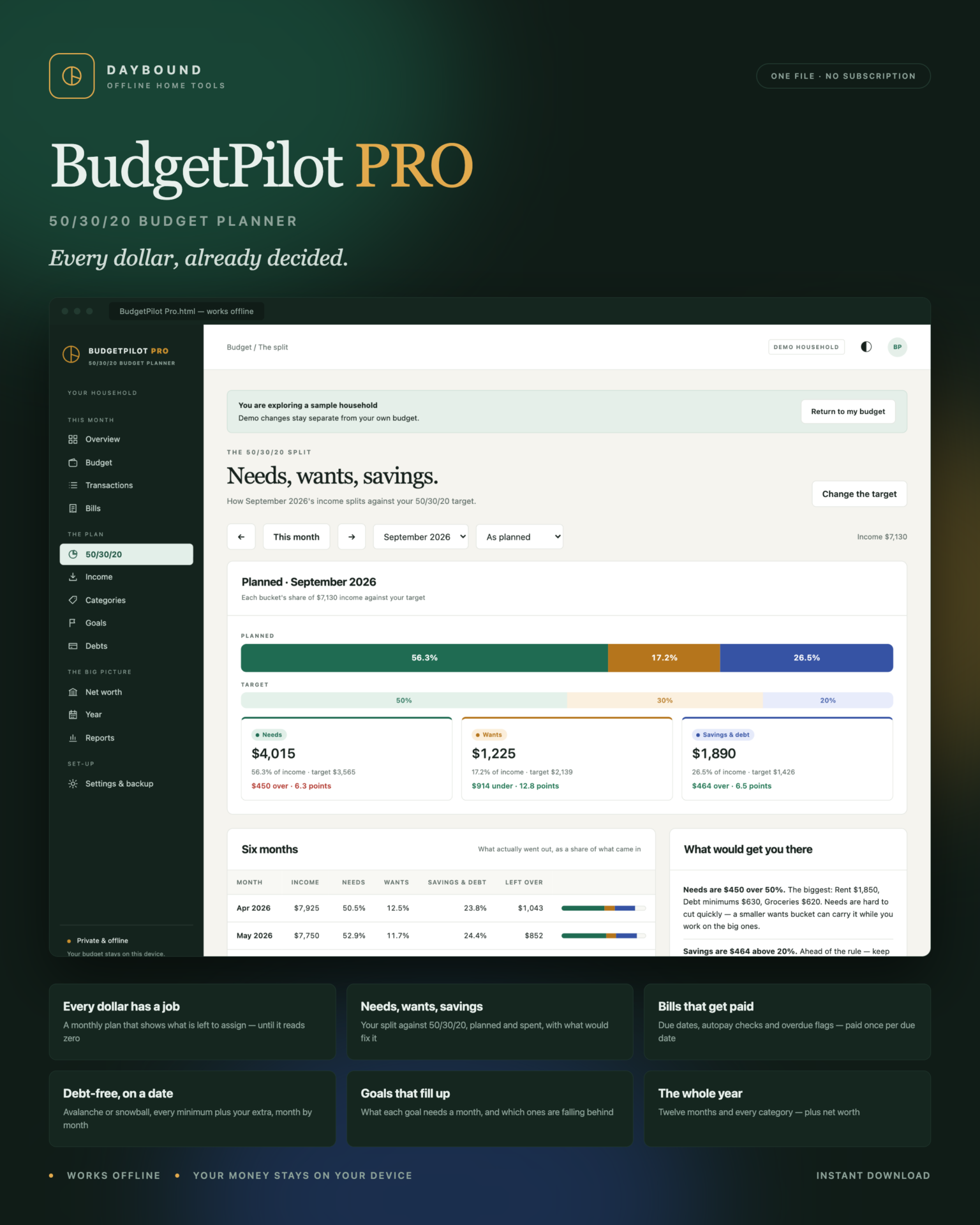
Needs, wants, savings - the 50/30/20 rule
- Each bucket’s share of income against your target, as planned or as spent.
- Six months of history and plain advice: what is over, what is under and what would fix it.
- 50/30/20 by default - change the target if your rent calls for 60/20/20.
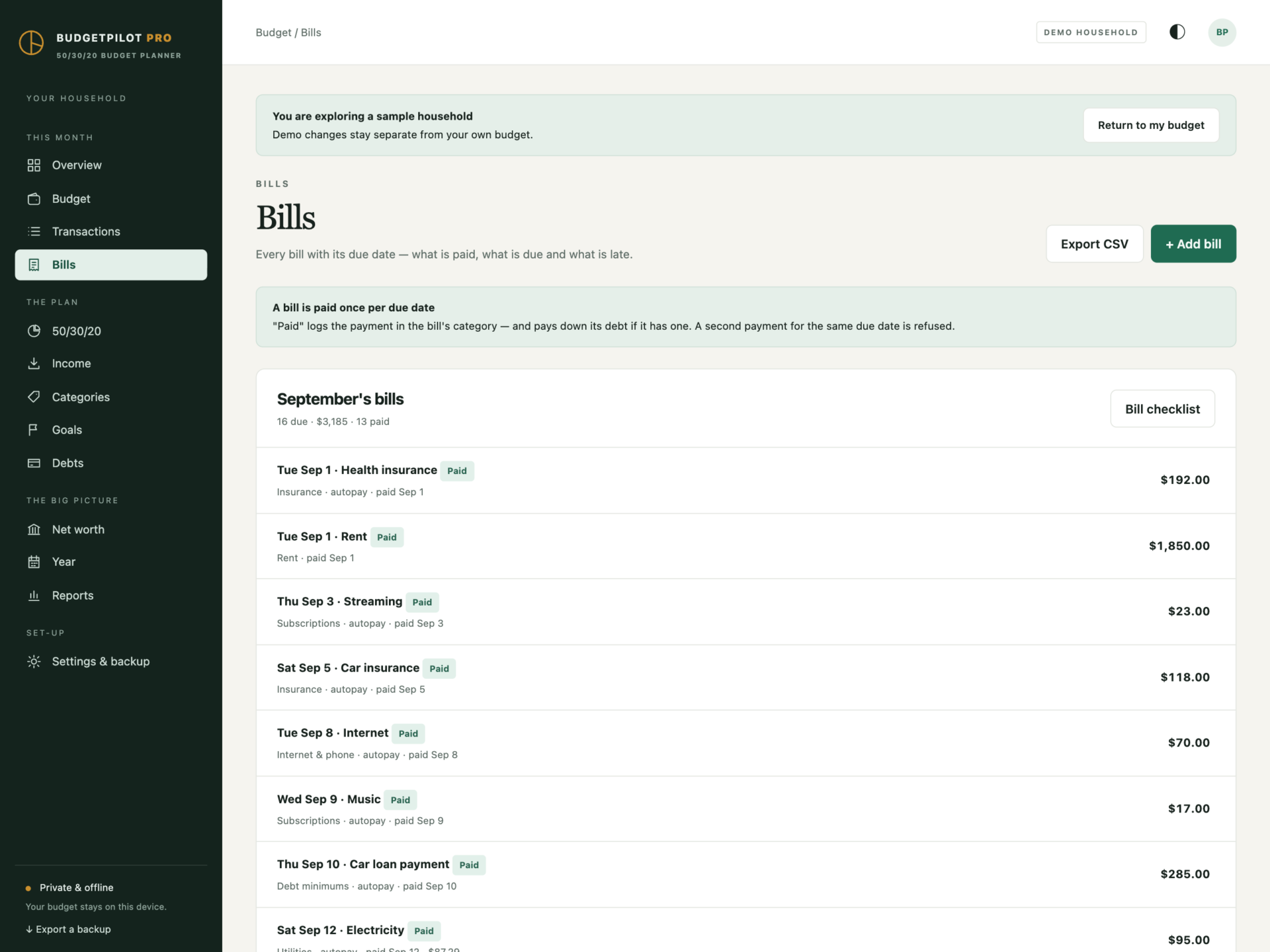
Bills that get paid
- Monthly, quarterly, twice-yearly and yearly bills from one due date.
- One click marks a bill paid in its category - and pays down its debt if it is a minimum payment. A second payment for the same due date is refused.
- Overdue flags for bills paid by hand, and a “check it went out” for autopay.
- A printable bill checklist for the month.
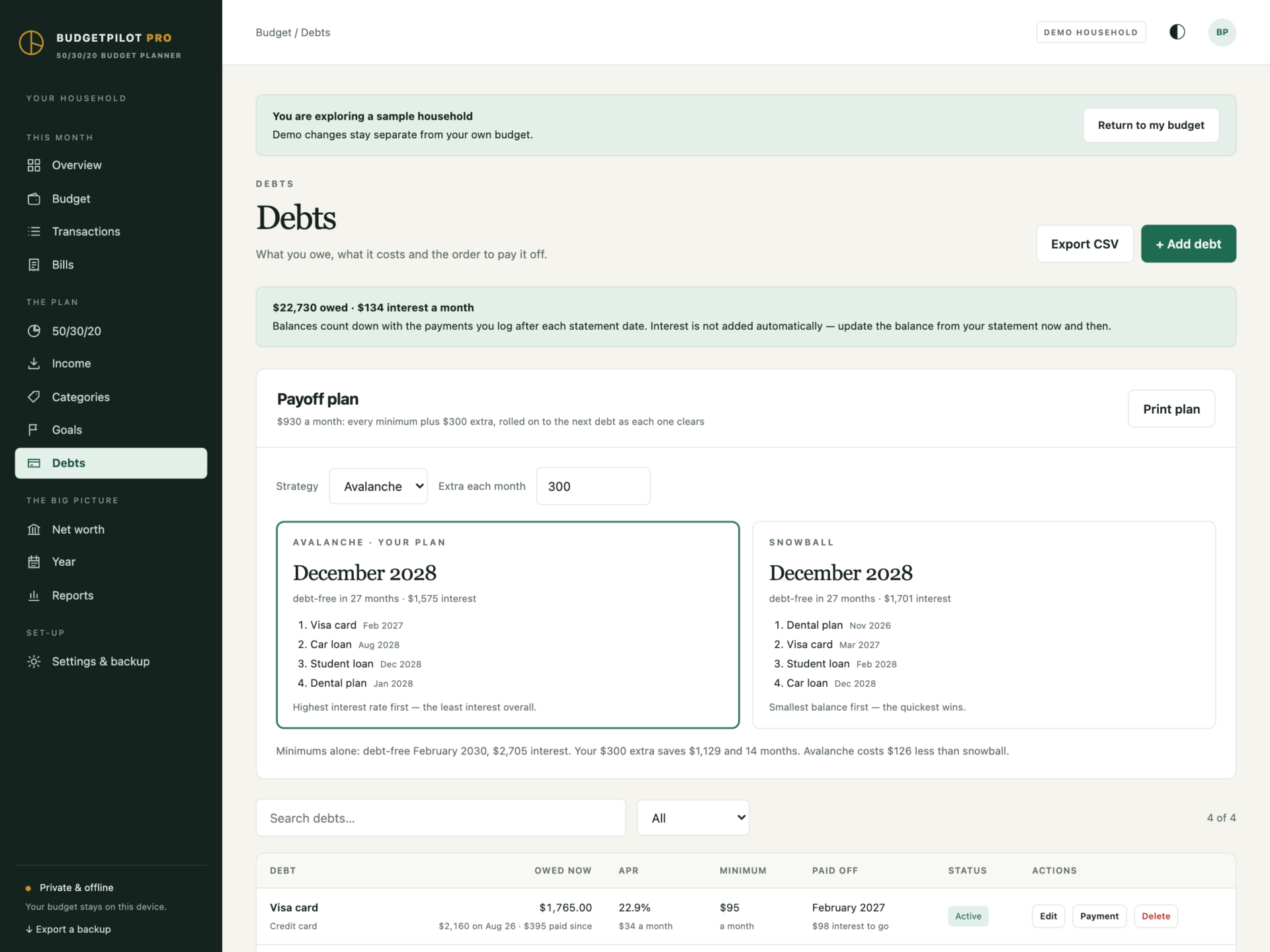
Debt-free, on a date
- Every debt from its statement balance, counted down by the payments you log.
- Avalanche (highest rate first) or snowball (smallest balance first), with every minimum plus your extra rolled on as each debt clears.
- The debt-free month and the interest for both strategies, and what your extra saves against minimums alone.
- A printable month-by-month payoff plan.
Goals that fill up
Each goal fills from its own savings category, shows what it needs each month to reach its date, and is flagged when this month’s plan falls short.
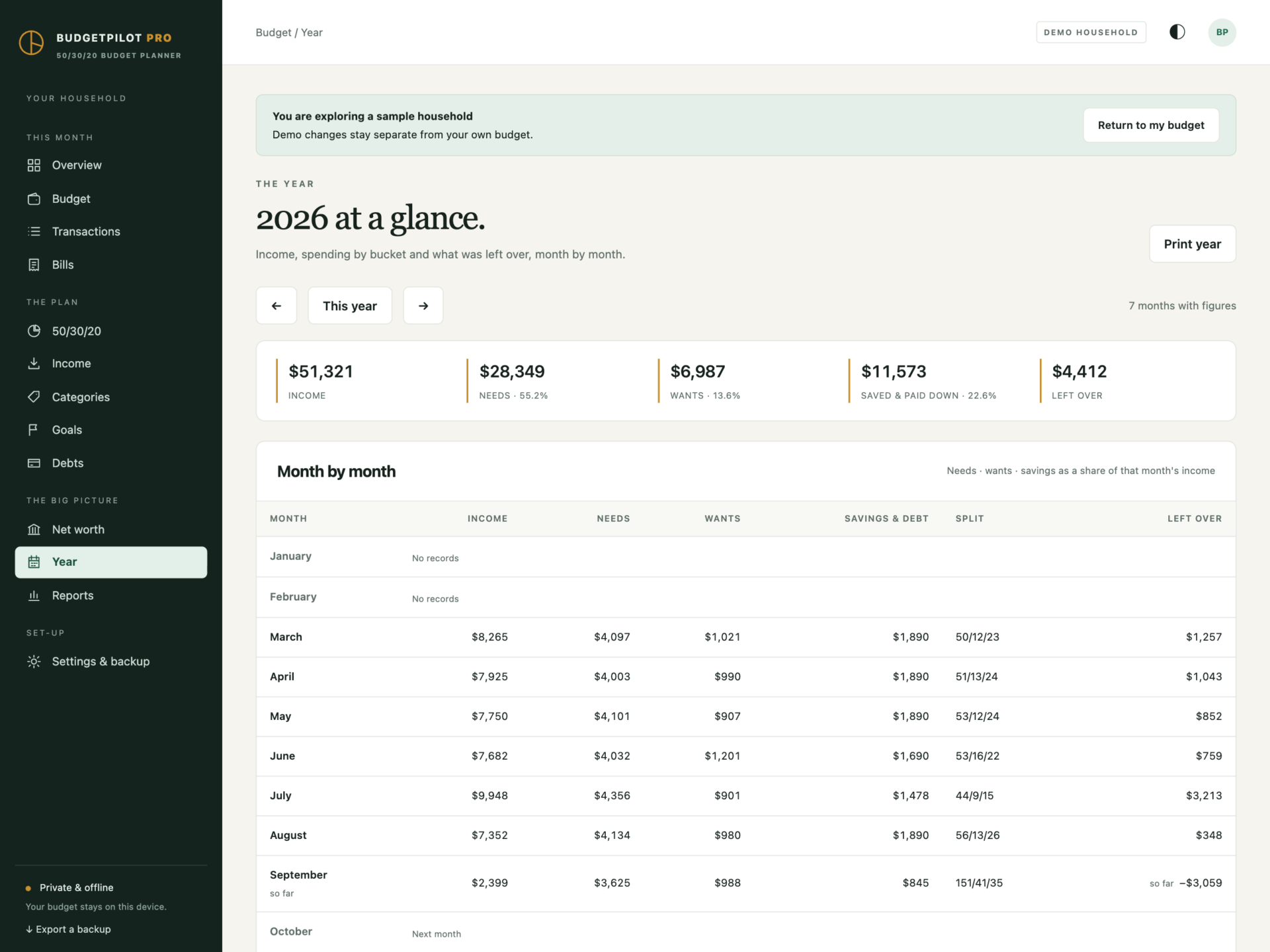
Paychecks, the year and net worth
- Paid weekly or every two weeks? The months with an extra paycheck are called out before they arrive.
- A year view: income, needs, wants, savings and left over month by month, plus every category by month.
- Net worth from your account balances against your debts.
- Printable budget sheet, monthly report and year summary.
Private by design
Your budget is stored by your browser on your own computer, separately from the HTML file, and is never uploaded. BudgetPilot never connects to a bank. Export a full backup at any time and restore it after a validation check: a backup with a bill paid twice, a debt paid past zero or a split that does not make 100% is refused rather than loaded.
What you receive
- BudgetPilot Pro.html: the complete offline application.
- Getting Started.html: set-up, the 50/30/20 rule, bills, goals, the debt payoff plan and how every number is worked out.
- License.html: the included licence for one household.
Delivered together in one ZIP download. Screenshots and the walkthrough show a fictional sample household from the app’s demo.
Before you buy
Use a current browser with JavaScript and local storage enabled - best on a desktop or laptop, and every screen also fits a tablet or phone. It runs on one device; there are no user accounts and no syncing between machines. This is a digital download; no physical item is shipped.
BudgetPilot Pro is a planner - you enter your transactions yourself. It does not link to bank accounts, import statements, pay bills or send reminders. Debt balances count down with the payments you log and interest is not added automatically, so update each balance from your statement now and then; payoff dates and interest are estimates. It is not financial advice.
Frequently asked questions
What is the 50/30/20 rule?
A simple way to split after-tax income: about half on needs (housing, groceries, utilities, insurance, minimum debt payments), about 30% on wants, and at least 20% on savings and paying debt down faster. BudgetPilot measures your real split against it every month.
Can I use a different split?
Yes. Set any split that adds up to 100% - 60/20/20 is common where rent is high - and every view follows.
Is it a zero-based budget?
It works that way if you want it to: “Left to assign” shows income not yet planned into a category, and the aim is zero - every dollar has a job.
Does it connect to my bank?
No. Nothing is linked and nothing is imported. You log transactions yourself - as you go, or once a week from your statement.
I’m paid every two weeks. Does it handle that?
Yes. Enter one payday and it works out the rest, including the months with a third paycheck, which it points out in advance.
Snowball or avalanche?
Both are calculated side by side. Avalanche pays the highest interest rate first and costs the least; snowball clears the smallest balance first for quicker wins. You choose, and set the extra you can pay each month.
Does it add interest to my debt balances?
No. Balances start from your statement and count down with the payments you log. Update the balance from a statement now and then. The payoff plan estimates interest from each APR.
Can my partner and I share it?
It runs on one device at a time. Keep one copy as the master and move it with the backup file.
Where is my budget stored?
In your browser’s storage on your own computer. Nothing is uploaded. Export a backup at the end of each month.
Do I need an internet connection or an account?
Only to download the file. After that it works completely offline, with no account.
Is it a subscription?
No. You pay once and the file is yours.
One-time purchase: $35, tax included. No recurring subscription - the price you see is the price you pay.
At a glance
How it runs
-
1
Download
You get the application as one HTML file, with its documentation guide and its licence.
-
2
Open
Double-click it. It opens in the browser you already have - Chrome, Edge, Safari or Firefox. There is nothing to install and no account to create.
-
3
Keep
Your records save to that browser on that device. Export a backup from the app whenever you want a copy of your own.


