

Sleep & Energy Tracker Plus
For anyone who wants to understand their own days instead of guessing.
Sleep, energy, naps and the habits that actually move them.
A short recording of the app, then the screens themselves.
$32.50
One-time purchase · yours to keep
Buy now- One payment - the file is yours to keep
- Works offline, no account, no subscription
- Your data stays on your own device
What's included
- 1 HTML file - the complete application
- 1 Getting Started guide (HTML)
- 1 License file
Delivery
Instant Download
Your files will be available to download once payment is confirmed.
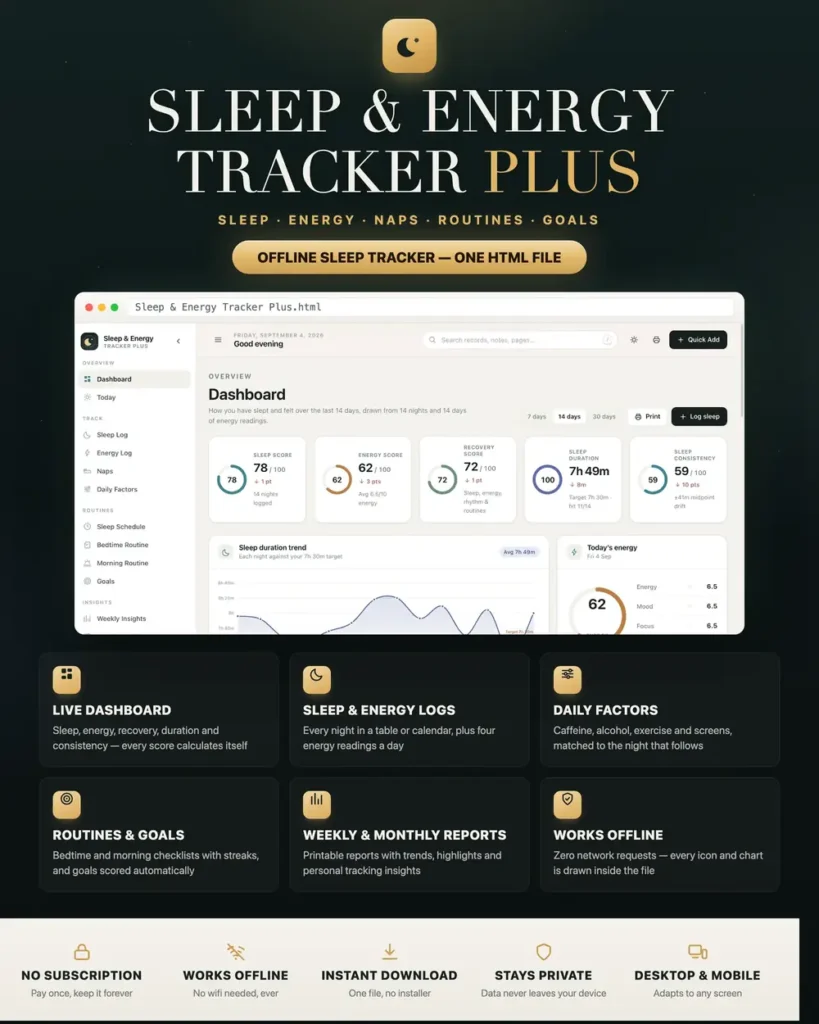
Sleep & Energy Tracker Plus is a personal sleep, energy and routine dashboard for anyone who wants to understand their own days instead of guessing at them. It runs from a folder of plain files in your browser - no installation, no account, no monthly subscription, and no data leaving your device.
Most people trying to sleep better already know what to try. What they lack is a clear picture of what is actually happening: how long they really slept, what the day before looked like, and whether this week is better or worse than the last. That is exactly the gap this fills.
Genuinely offline - not just "works offline-ish"
Most HTML dashboards quietly load their fonts, icons and charts from the internet, so they break the moment you lose connection. This one makes zero network requests. There is no chart library, no web font, no CDN link and no external asset anywhere - every icon and every chart is drawn by the application itself, in inline SVG. Open it on a plane, in a cabin with no signal, or on a computer that has never been online, and it looks and behaves exactly the same.
Sleep, mood and health data is about as personal as it gets. Yours never leaves your machine. Nothing is uploaded anywhere, ever, and there is no account for anyone to breach.
A dashboard that answers the real question
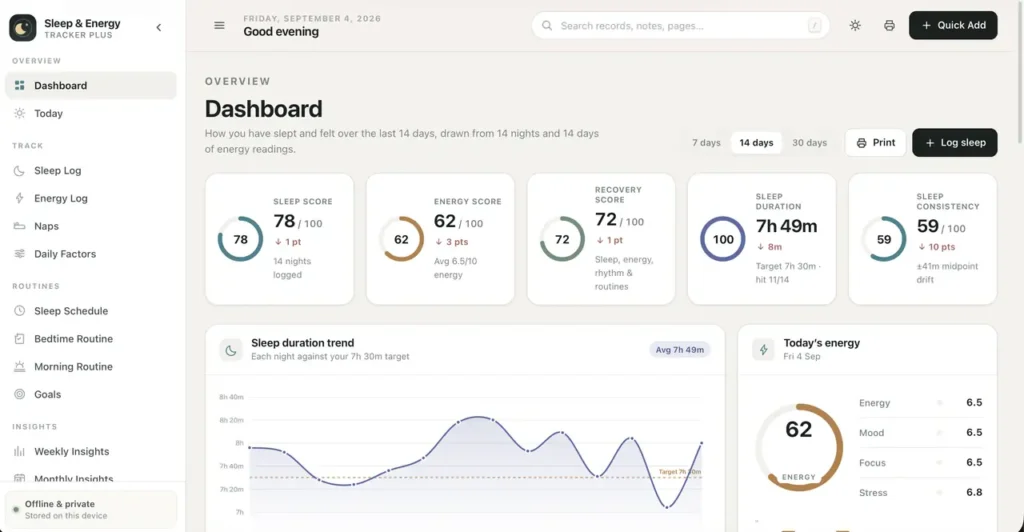
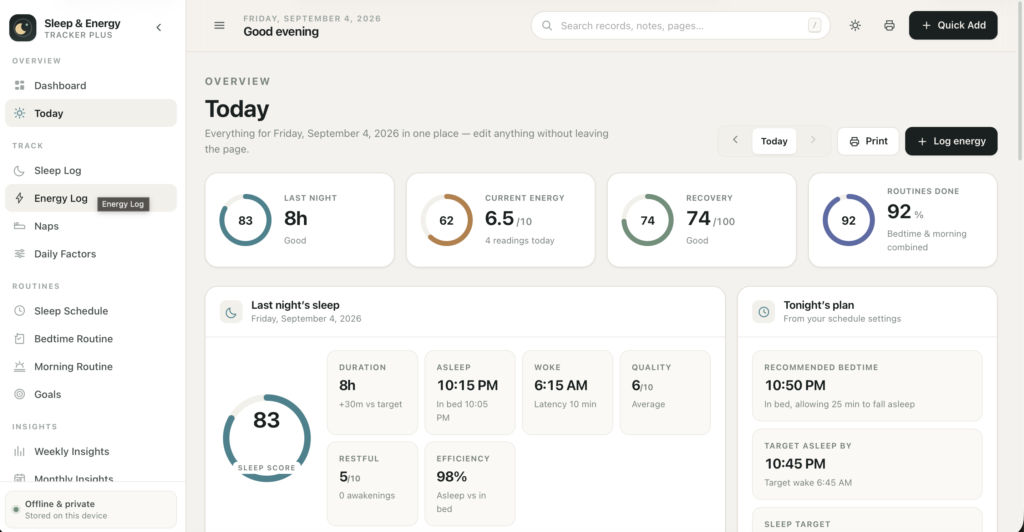
Five headline scores - Sleep Score, Energy Score, Recovery Score, Sleep Duration and Sleep Consistency - each with a radial gauge and a comparison against the previous period, so you can see direction, not just today.
- Sleep duration charted against your own target, night by night
- Energy, mood and focus trends drawn together
- Sleep quality bars, colour-coded by how the night went
- An energy-vs-sleep scatter plot with a trend line - the clearest answer to "does more sleep actually help me?"
- A sleep-window chart showing when you were asleep each night against your target window
- Your last five nights, today's energy, quick actions, and observations generated from your own records
- Switch the whole dashboard between 7, 14 and 30 days
Not one number is hard-coded. Every figure is calculated from your own records the moment you open the page.
Sleep log
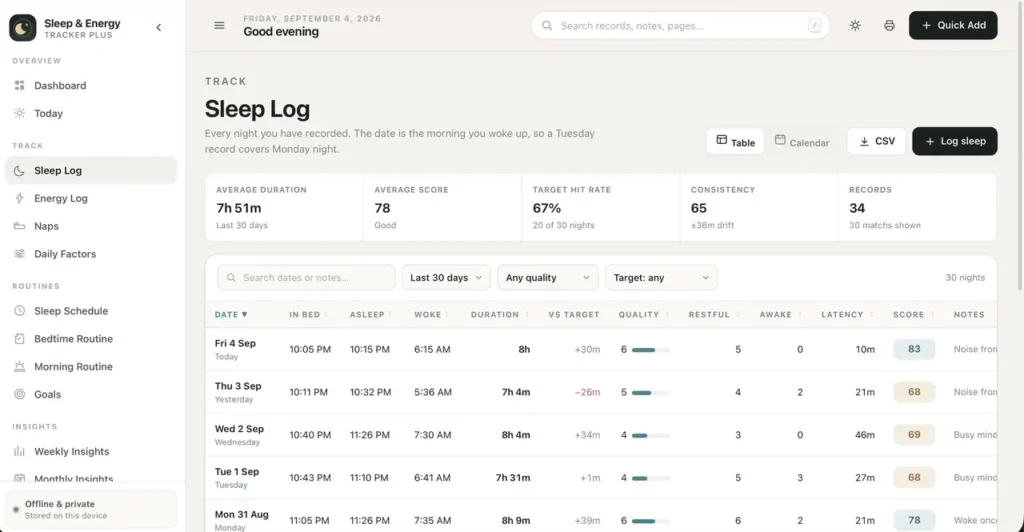
- Log bedtime, time you fell asleep, wake time, quality, restfulness, night awakenings and how long you took to drop off
- Duration, difference from target, sleep efficiency and a 0–100 sleep score are worked out for you as you type
- The time-to-fall-asleep field stays in step with your bedtime and asleep times automatically
- Table view with search, date-range, quality and target filters, sortable columns and pagination
- Calendar view showing every night of the month with duration and a colour bar for the score
- Edit, duplicate or delete any night; export the whole log to CSV
Energy log
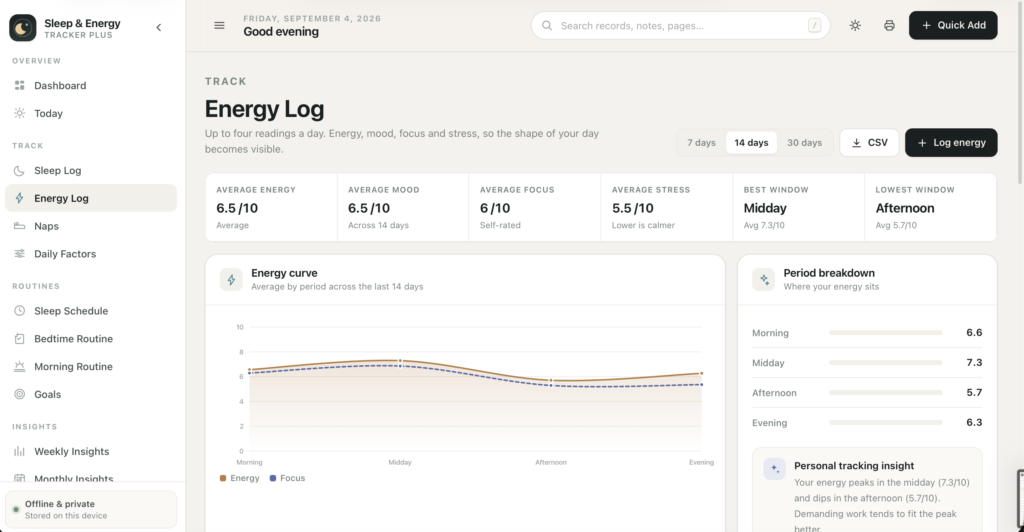
- Up to four readings a day - morning, midday, afternoon and evening - each covering energy, mood, focus and stress
- Your average energy curve across the day, so you can see your real peak instead of assuming it
- Daily trend, weekday pattern, best window and lowest window
- Searchable, filterable table with per-reading energy scores
Naps
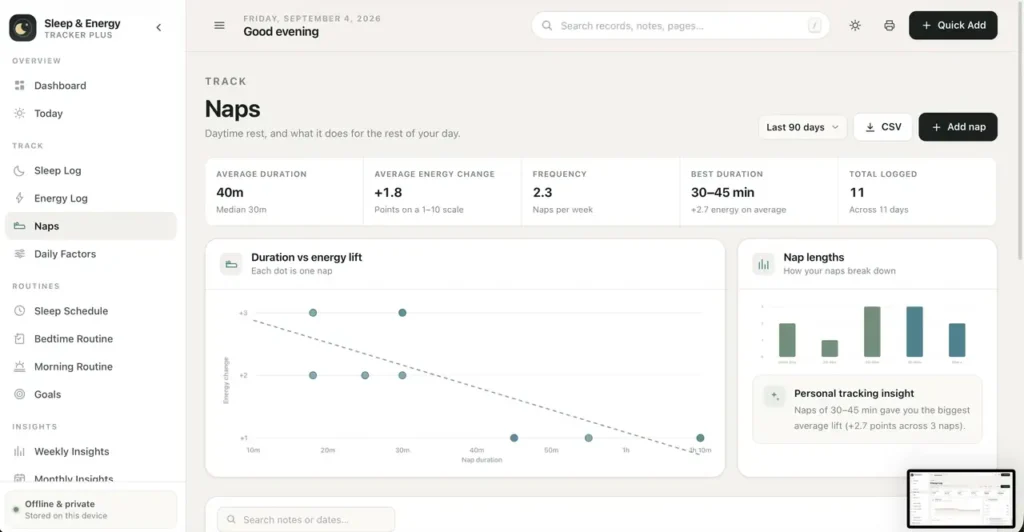
- Start, end, quality, and your energy before and after
- Average duration, average energy change, naps per week
- A duration-versus-lift chart and a plain answer to which nap length works best for you
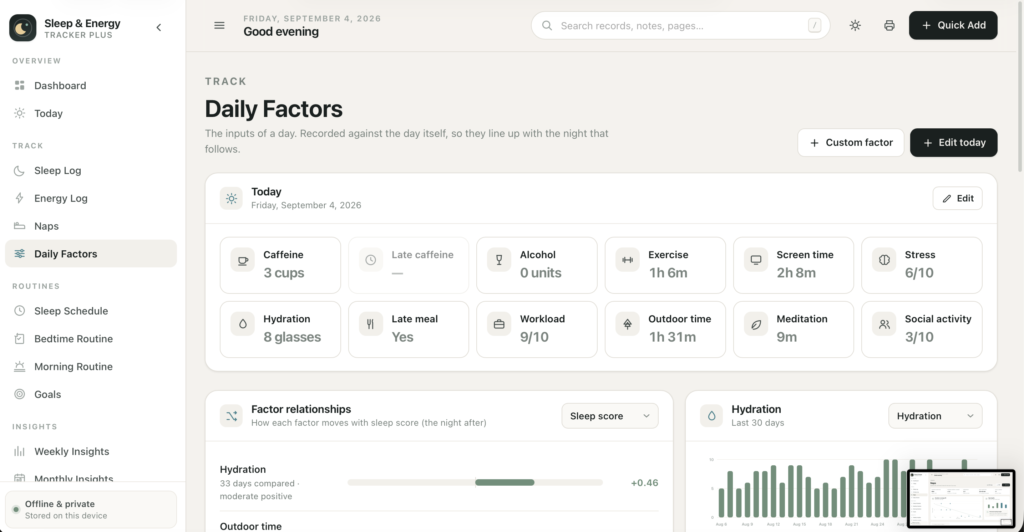
Daily factors
- Twelve built-in factors: caffeine, late caffeine, alcohol, exercise, screen time before bed, stress, hydration, late meals, workload, outdoor time, meditation and social activity
- Add your own custom factors - counts, minutes, 1–10 scales or yes/no
- Relationship analysis against sleep score, sleep duration, energy or mood, with a plain-English strength for each
- A higher-days versus lower-days comparison for whichever factor you are focused on
- Factors are dated to the day they happened, so they line up with the night that follows - the comparison is actually correct
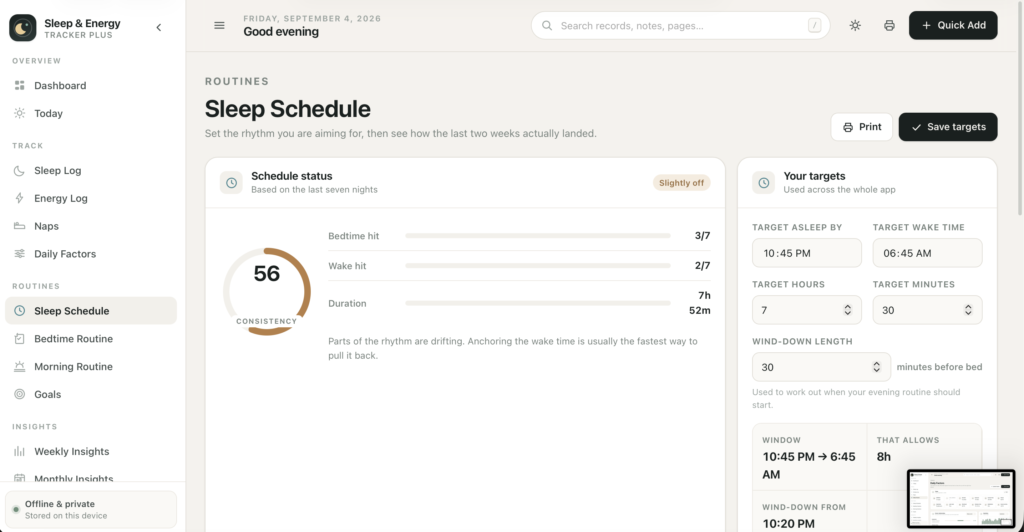
Sleep schedule & routines
- Set your target bedtime, wake time, sleep duration and wind-down length
- An honest verdict on the last seven nights: On target, Slightly off, or Needs attention
- A recommended bedtime worked out from your target wake time and how long you have actually been taking to fall asleep
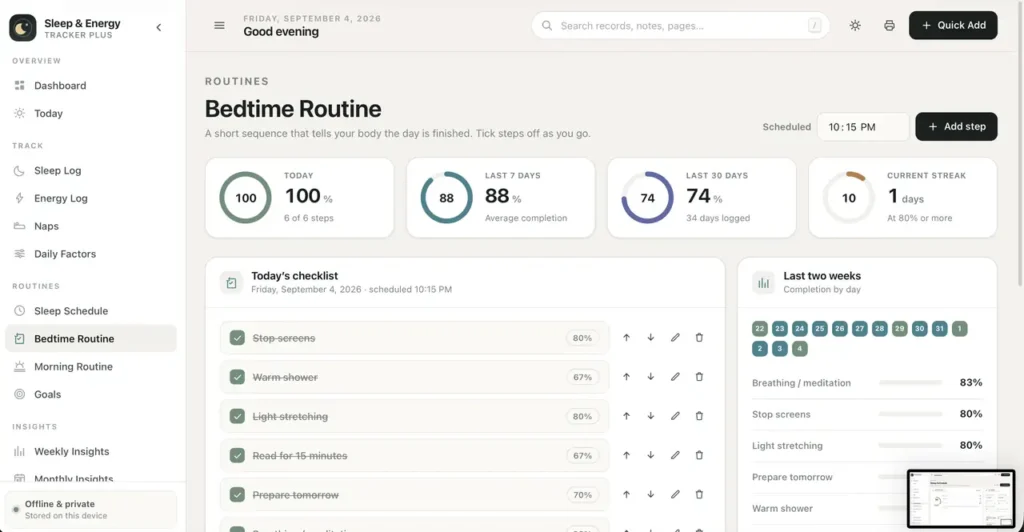
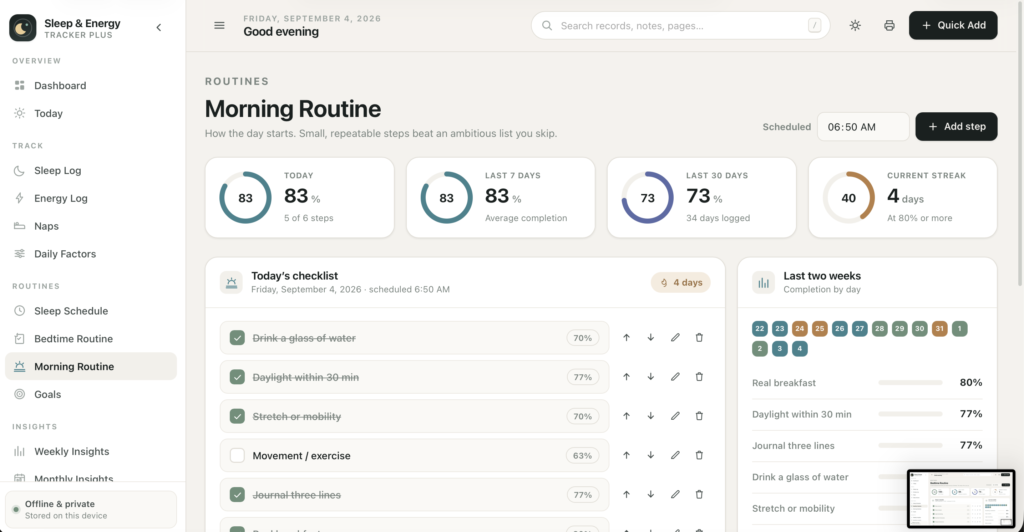
- Bedtime and morning routines as editable checklists - add, rename, reorder, delete, or restore the defaults
- Completion percentage, current streak, per-step success rates and a 30-day trend for each routine
Goals that score themselves
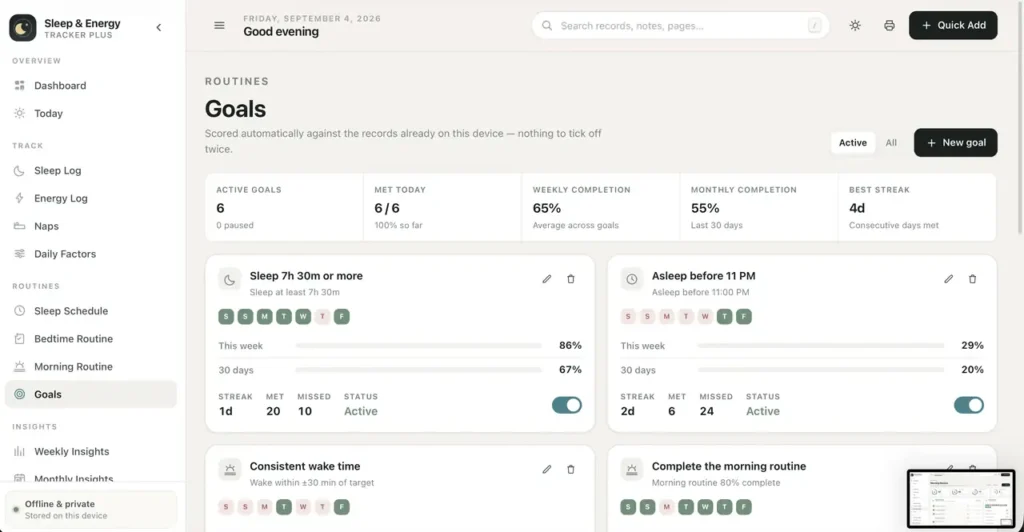
Eight goal types: sleep at least a set duration, be asleep before a set time, wake within a window of your target, keep average energy above a level, complete either routine, keep a daily factor at or below a value, or limit naps. Each one is scored automatically from the records you already keep - there is nothing to tick off twice. Every goal shows a seven-day strip, weekly and monthly completion, and a current streak, and can be paused without losing its history.
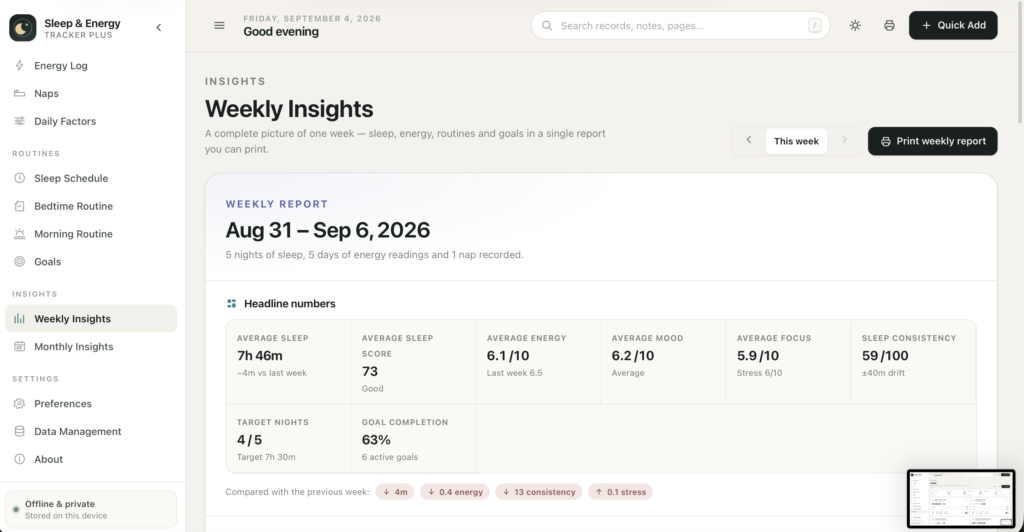
Weekly & monthly reports
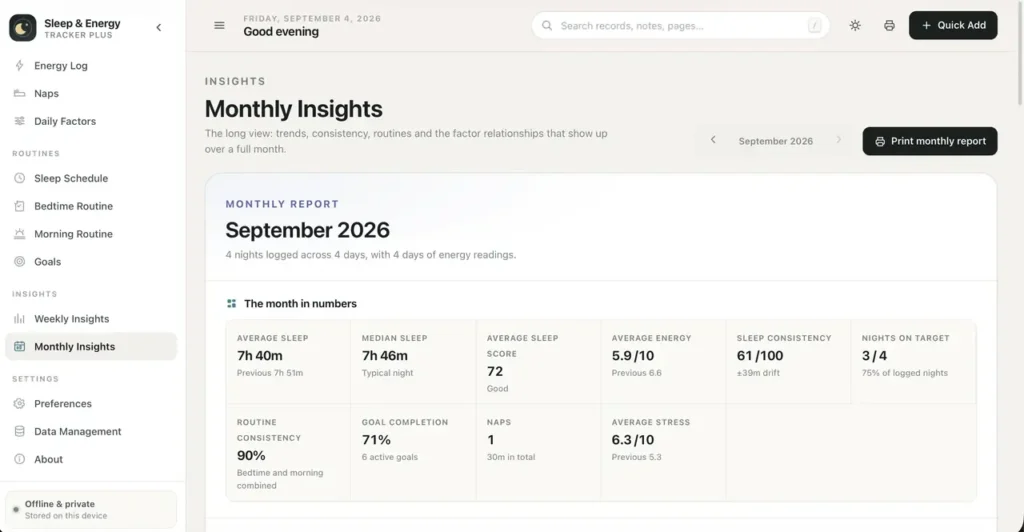
Two report-style pages built to be printed or saved as PDF. The weekly report gives averages with week-on-week movement, sleep by night, energy, mood and focus, your best and worst nights, best and lowest energy days, routine and schedule adherence, per-goal results and generated observations. The monthly report adds long-run trends, routine consistency, a week-by-week breakdown table, factor relationships and monthly highlights. Every page in the app prints cleanly with a branded header.
Personal tracking insights, written in plain english
The app reads your records and writes out what it sees: "Your average sleep was 7h 41m this week, 28 minutes above last week." "On days after 7h 30m+ of sleep your average energy was 1.5 points higher." "Your bedtime was consistent on 5 of the last 7 days." Every one is clearly labelled as a personal tracking observation, and relationships are always described as patterns rather than causes.
Built to be fast to use
- Quick Add from anywhere - sleep, energy, nap, daily factors or a new goal
- Global search across pages, nights, readings, naps, goals and notes; press / or Ctrl/⌘ K
- Live calculation inside every form, so you see the score before you save
- Real validation with clear inline messages, and a confirmation step before anything is deleted
- Toast confirmations, smooth modals, chart tooltips, Esc to close, and keyboard focus handled properly throughout
Make it yours
- A restrained sage-and-teal interface designed for calm daily use, not a spreadsheet in disguise
- A genuinely designed dark mode - a separate palette, not an inversion - remembered between sessions
- 12- or 24-hour clock, week starting Monday or Sunday, your own name in the greeting
- Every colour is a CSS variable at the top of one stylesheet, so rebranding takes minutes
Your data, your control
- Records save automatically to your browser as you work
- One-click JSON export and backup; import with a choice of merging or replacing, and duplicates are skipped automatically
- Separate CSV exports for sleep, energy, naps and daily factors, with the calculated columns included
- Remove the sample data without touching anything you added yourself
- Delete everything, guarded by a typed confirmation
- If your browser ever blocks storage, the app says so immediately in plain language instead of silently losing your work
Every section is built and working
All fifteen pages - Dashboard, Today, Sleep Log, Energy Log, Naps, Daily Factors, Sleep Schedule, Bedtime Routine, Morning Routine, Goals, Weekly Insights, Monthly Insights, Preferences, Data Management and About - are complete and functional today, and every button in the interface does something.
Compatibility
Works in any modern browser: Chrome, Edge, Brave, Safari 15+ or Firefox 100+, on macOS, Windows, iOS and Android. Fully responsive from phone to ultrawide - the sidebar becomes a slide-out drawer, tables become readable cards, and every control is touch-sized.
Honest limitations
Because this is an offline application, it does not connect to a smartwatch, phone or Oura/Whoop/Fitbit account, import health data automatically, send reminders or notifications, or sync between devices and people. You enter your own records; that is the point, and it is also the work. Every figure comes from what you enter.
This is a personal tracking tool, not a medical device. It does not diagnose, treat or give medical advice, and its observations are descriptions of your own numbers. If you are concerned about your sleep or your health, speak to a qualified professional.
Records are stored in your own browser, so export a backup regularly and keep it somewhere safe. Nobody can recover them for you.
This is a digital download - no physical item will be shipped. Change-of-mind purchases are final once the file has been delivered; faulty or misdescribed files are covered by the refund policy.
Questions
Do I need an internet connection?
Only to download it. After that it never touches the network again.
Do I need to install anything?
No. Unzip the folder and double-click index.html. It opens in the browser you already have.
Where is my data stored?
In your own browser's local storage, on your own device. There is no server and no account. Export a backup from Settings whenever you want a copy you control.
Does it sync between my laptop and my phone?
No - there is no server to sync through. You can move a snapshot across with the JSON export and import.
Can it import data from my smartwatch?
Not in this version. Records are entered by hand.
Can I change the colours and branding?
Yes. The whole palette is a set of CSS variables at the top of one stylesheet, and the name, logo and text are plain HTML.
Is this medical software?
No. It is a personal tracking tool. It does not diagnose anything and gives no medical advice.
At a glance
How it runs
-
1
Download
You get the application as one HTML file, with its documentation guide and its licence.
-
2
Open
Double-click it. It opens in the browser you already have - Chrome, Edge, Safari or Firefox. There is nothing to install and no account to create.
-
3
Keep
Your records save to that browser on that device. Export a backup from the app whenever you want a copy of your own.


