

StockDesk Pro
For small retailers, online sellers, studios and wholesalers.
Products, locations, purchase and sales orders, stock counts and expiry, in one offline workspace.





A short recording of the app, then the screens themselves.
$39
One-time purchase · yours to keep
Buy now- One payment - the file is yours to keep
- Works offline, no account, no subscription
- Your data stays on your own device
What's included
- 1 HTML file: the complete StockDesk Pro application
- 1 Getting Started guide (HTML)
- 1 License file (HTML)
Delivery
Instant Download
Your files will be available to download once payment is confirmed.
Inventory management, in one place
StockDesk Pro brings your products, locations, suppliers, purchase orders, sales orders and stock counts into one offline workspace. See what you hold, what is reserved, what is on order and what is about to expire, without a monthly software subscription.
Built for small businesses, retailers, online sellers, studios and wholesalers. Download the HTML application, open it in your browser and start with your own products, or explore the separate demo workspace: a homeware business with 26 products across four locations and a complete stock ledger.
What you hold, right now
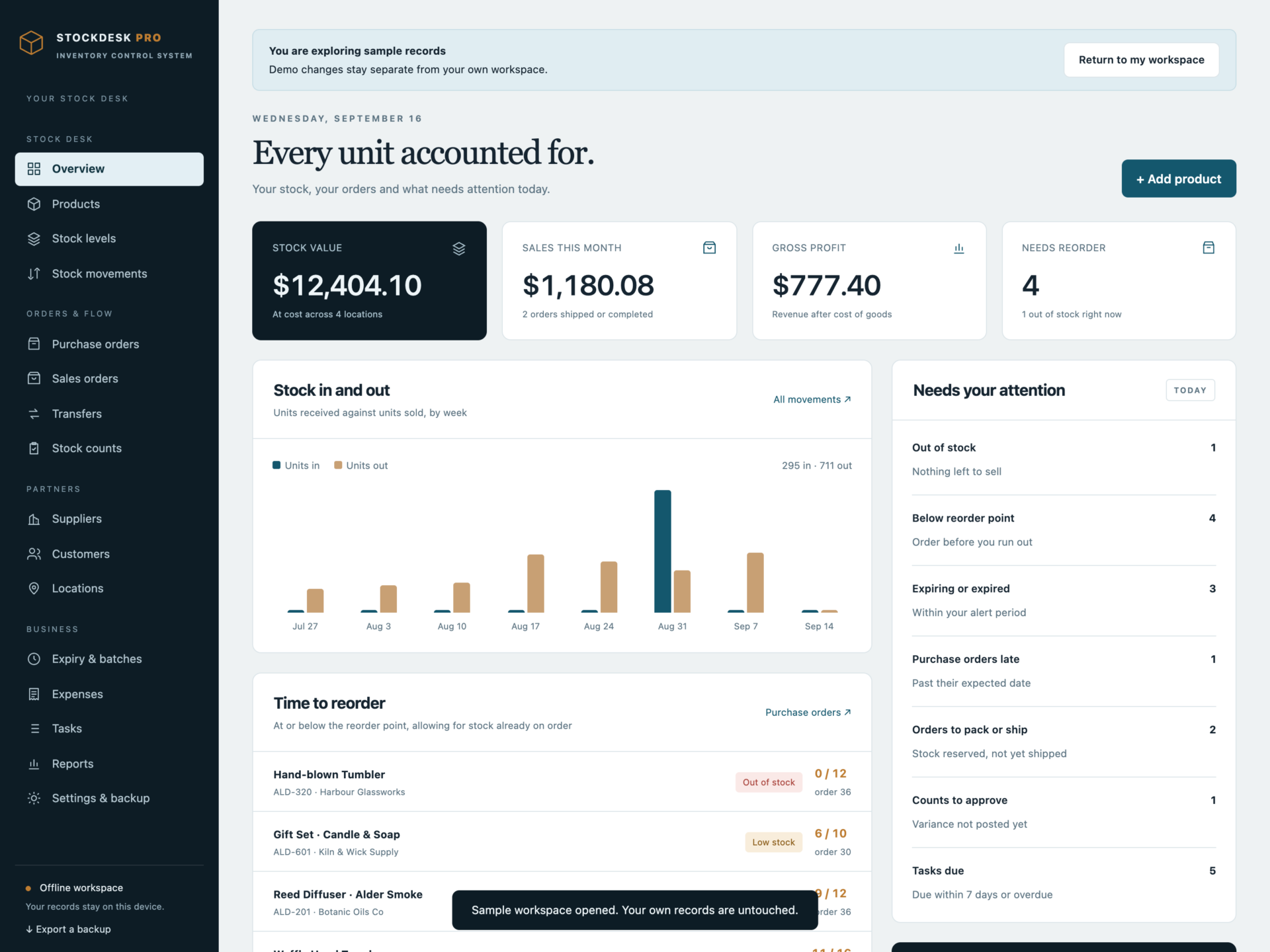
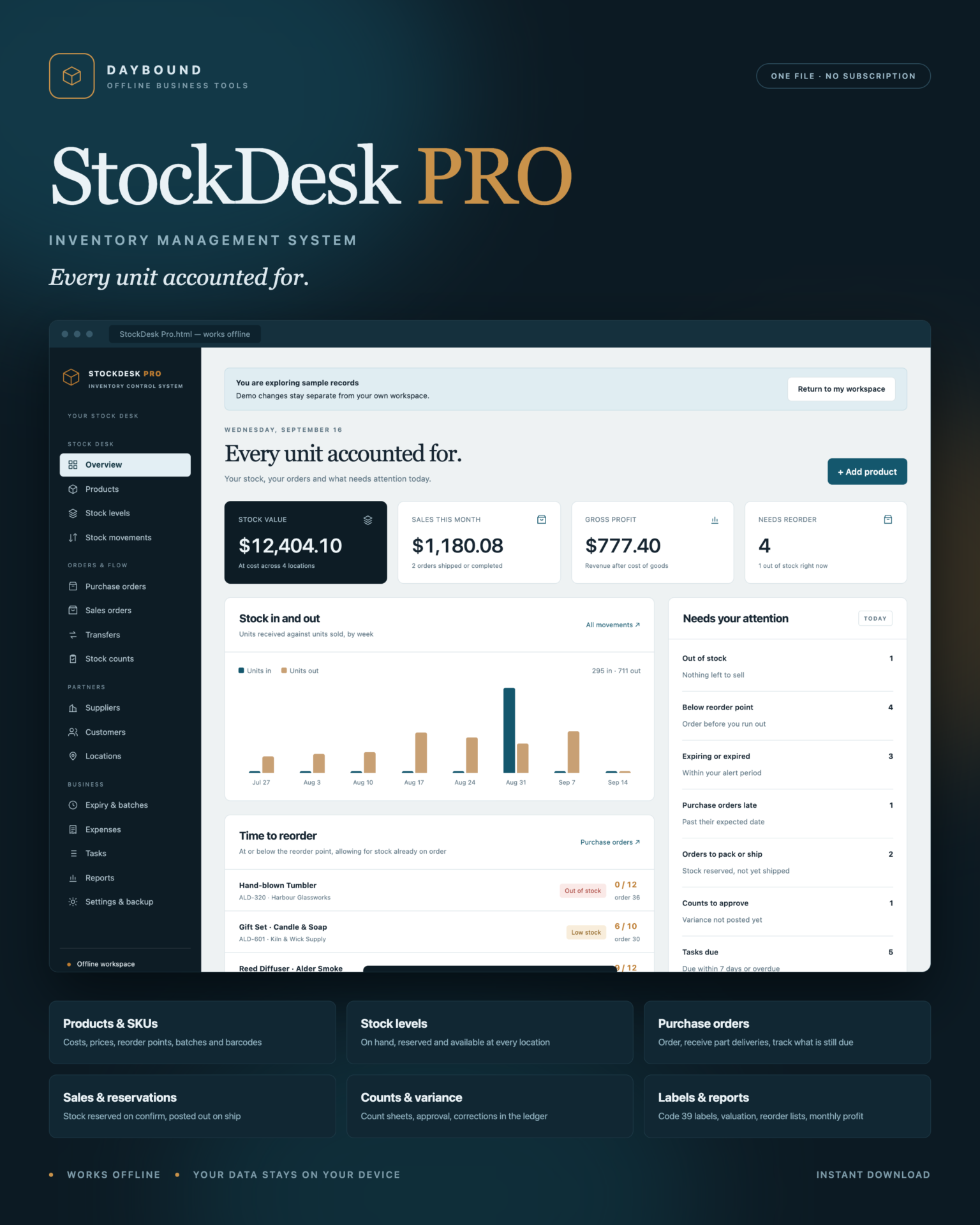
- Overview: stock value at cost, sales this month, gross profit, products needing reorder, and a list of what needs attention - out-of-stock lines, expiring batches, late deliveries, orders to ship, counts to approve and tasks due.
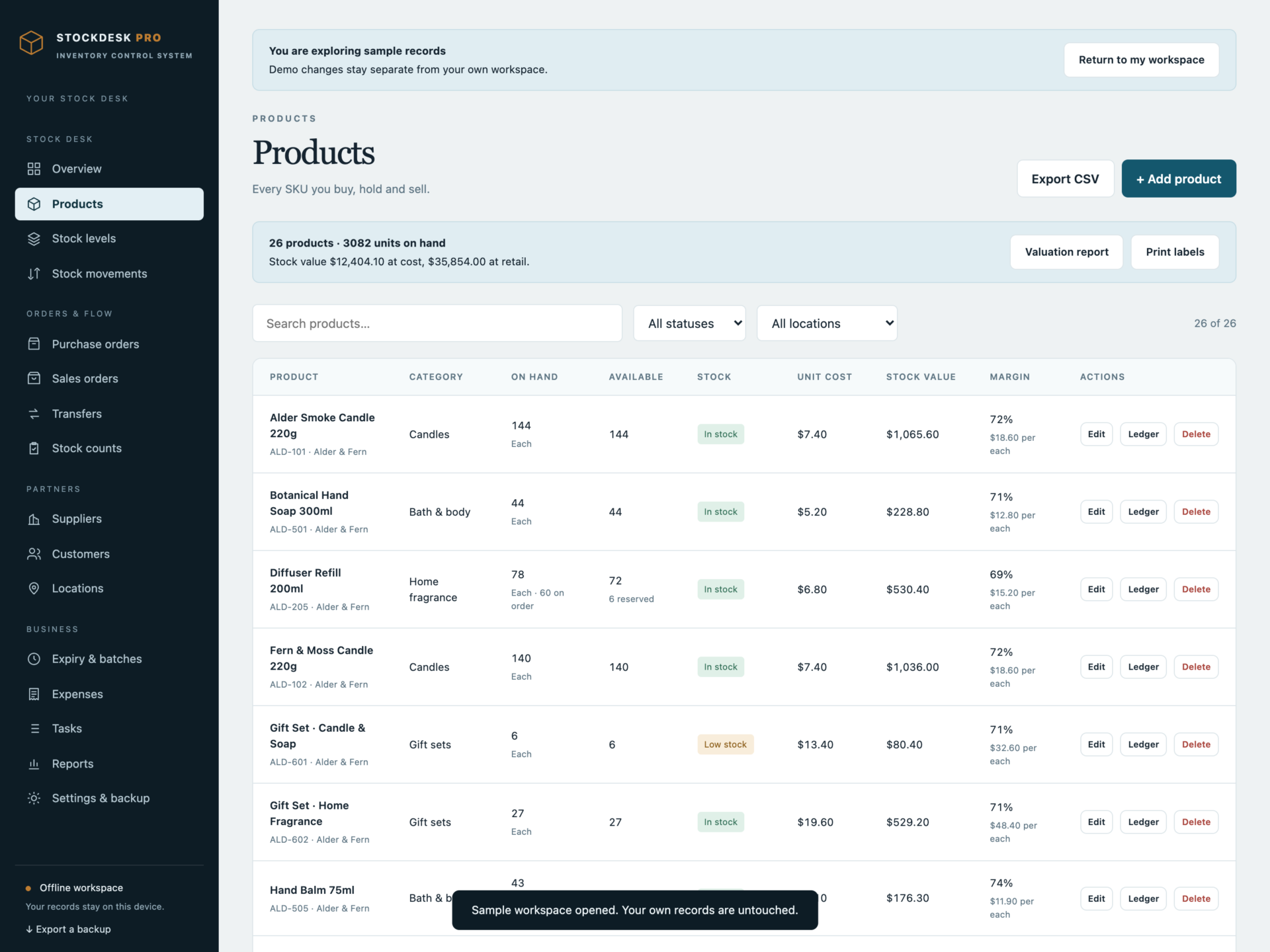
- Products: SKU, barcode, category, unit, cost, selling and wholesale price, reorder point, reorder quantity, maximum level, batch, expiry and preferred supplier.
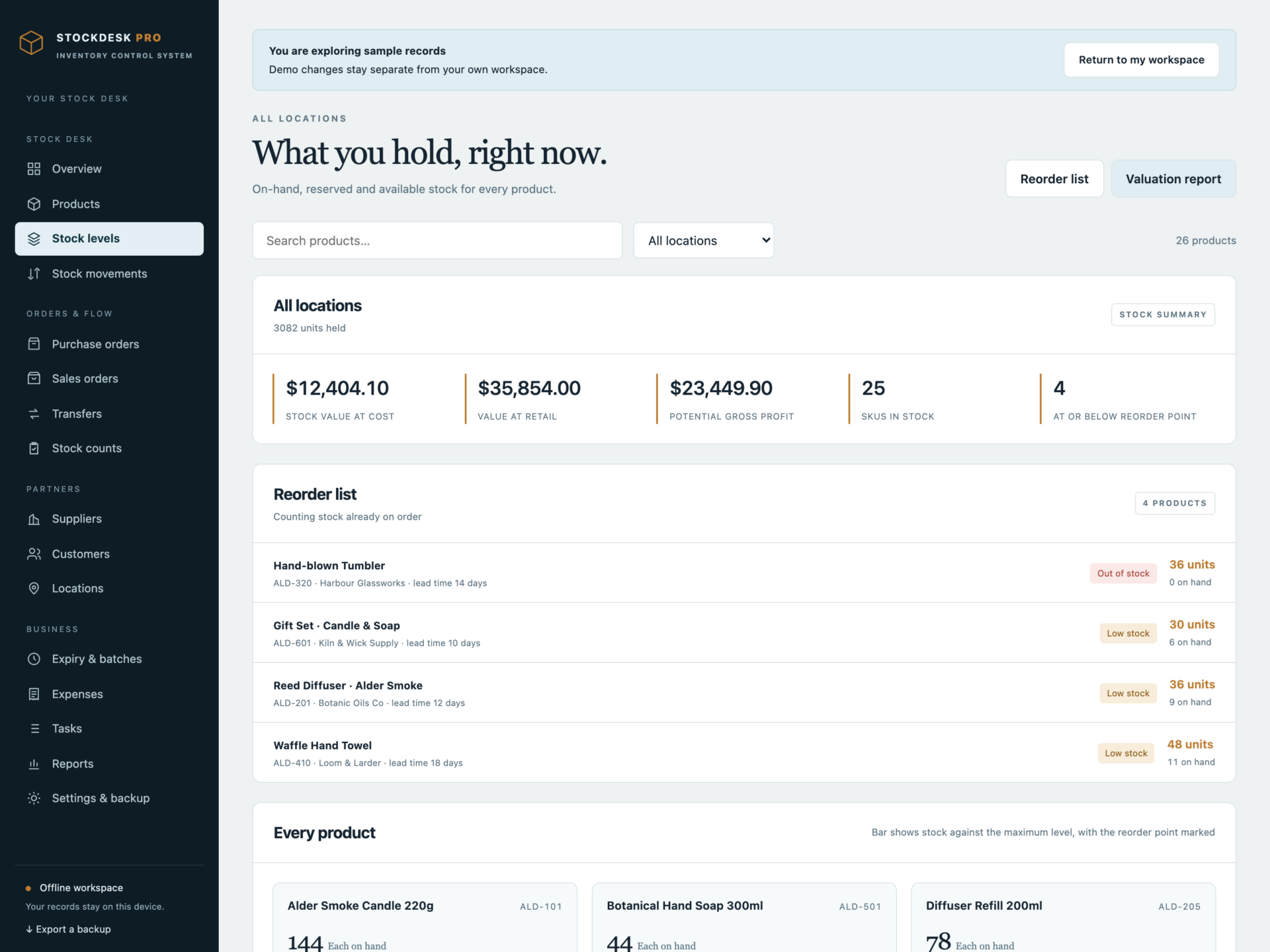
- Stock levels: on hand, reserved and available per location, with a level bar per product and the reorder point marked.
- Locations: warehouses, shop floors, stockrooms, studios, shelves and vehicles, each with its own SKU count, units held and stock value.
A real stock ledger, not a quantity field
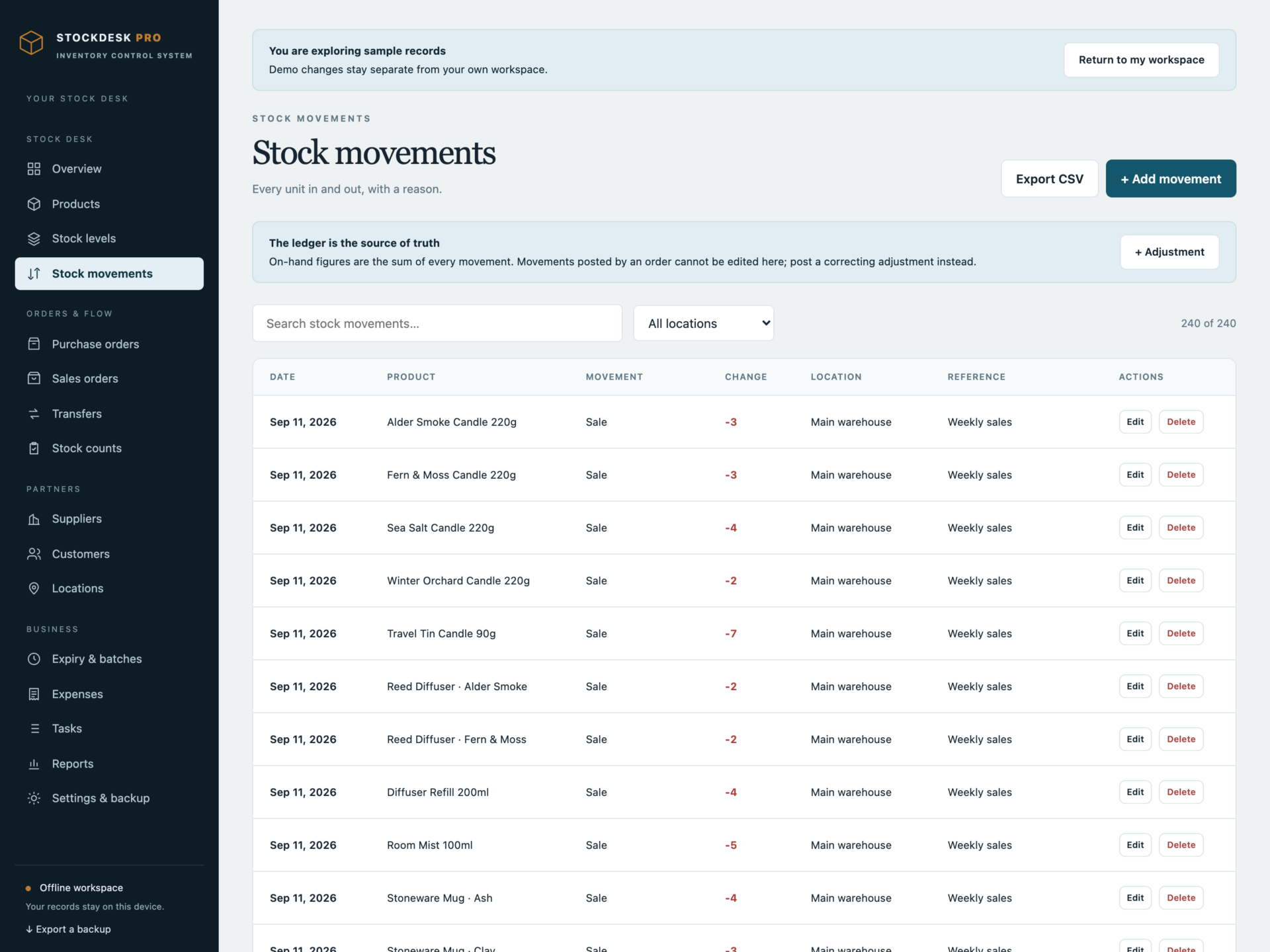
Every on-hand figure is the sum of the movements recorded against that product at that location - receipts, sales, transfers, returns, damage, loss, internal use and count corrections. Nothing silently overwrites a quantity, so you can always see why a number is what it is.
- Stock can never fall below zero: a movement that would take it there is refused, with the quantity actually on hand.
- Movements posted by an order are locked, so history stays true; corrections are posted as their own adjustment.
- Every movement keeps its date, reference and note.
Purchase orders and receiving
- Order lines with quantity and unit cost, plus shipping, discount and tax.
- Statuses from draft through sent, confirmed, partially received and received.
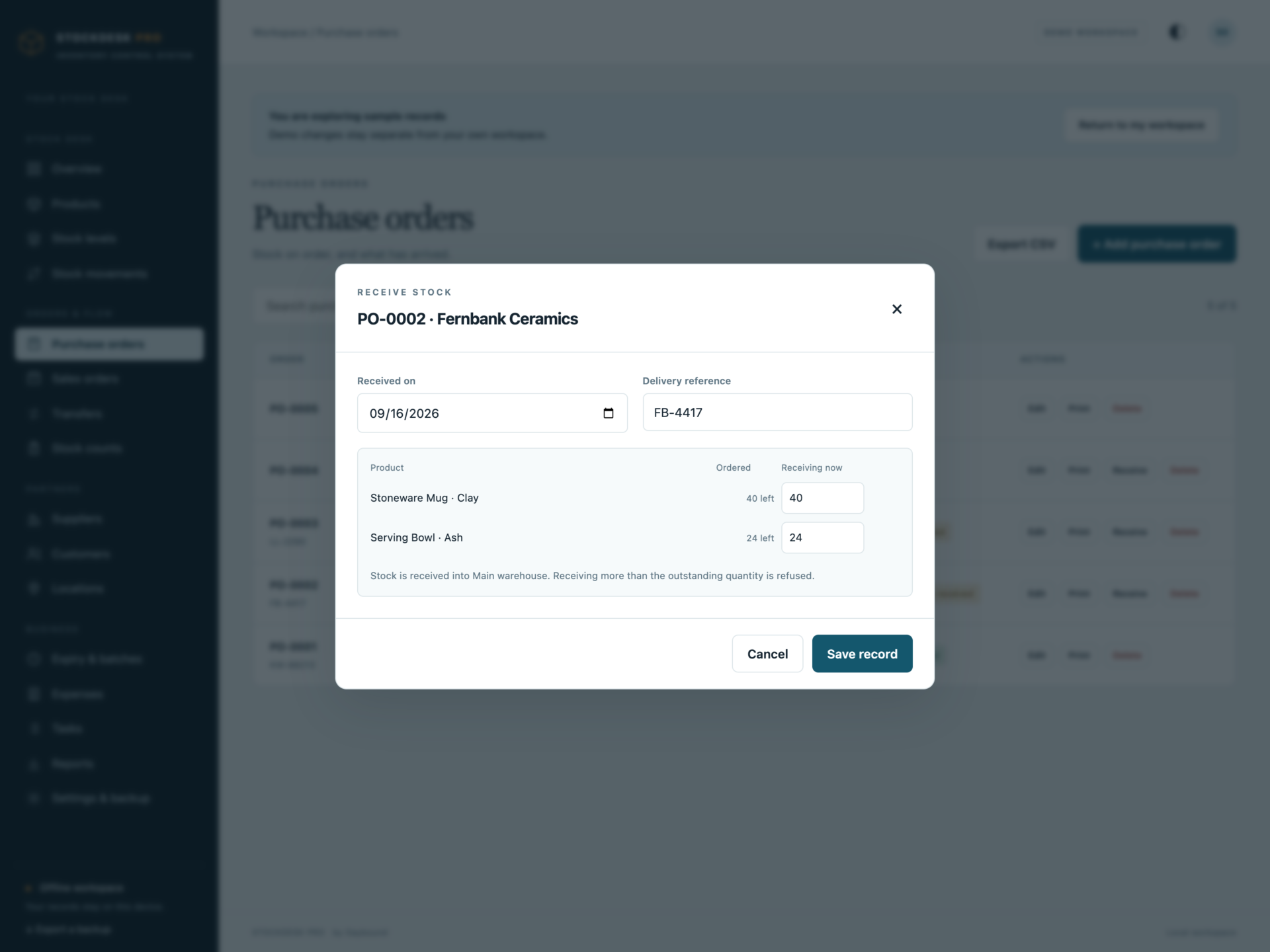
- Receive line by line as deliveries arrive. Receiving more than is outstanding is refused, and a short delivery leaves the order partially received.
- Outstanding quantities count as on order, so the reorder list never asks you to order twice.
Sales orders, reservations and profit
- Order lines priced per customer, by channel: shop, online store, marketplace, wholesale, market stall or phone.
- Confirming an order reserves the stock; an order that would reserve more than is available is refused.
- Shipping posts the stock out and releases the reservation.
- Profit per order, calculated against unit cost.
Transfers and stock counts
- Move stock between your own locations, with the source checked before anything moves.
- Full counts, cycle counts and spot checks, with the expected quantity shown as you enter what you counted.
- Approving a count posts only the difference, and an approved count cannot be approved twice.
- Printable count sheets with boxes to write in.
Expiry, suppliers and spend
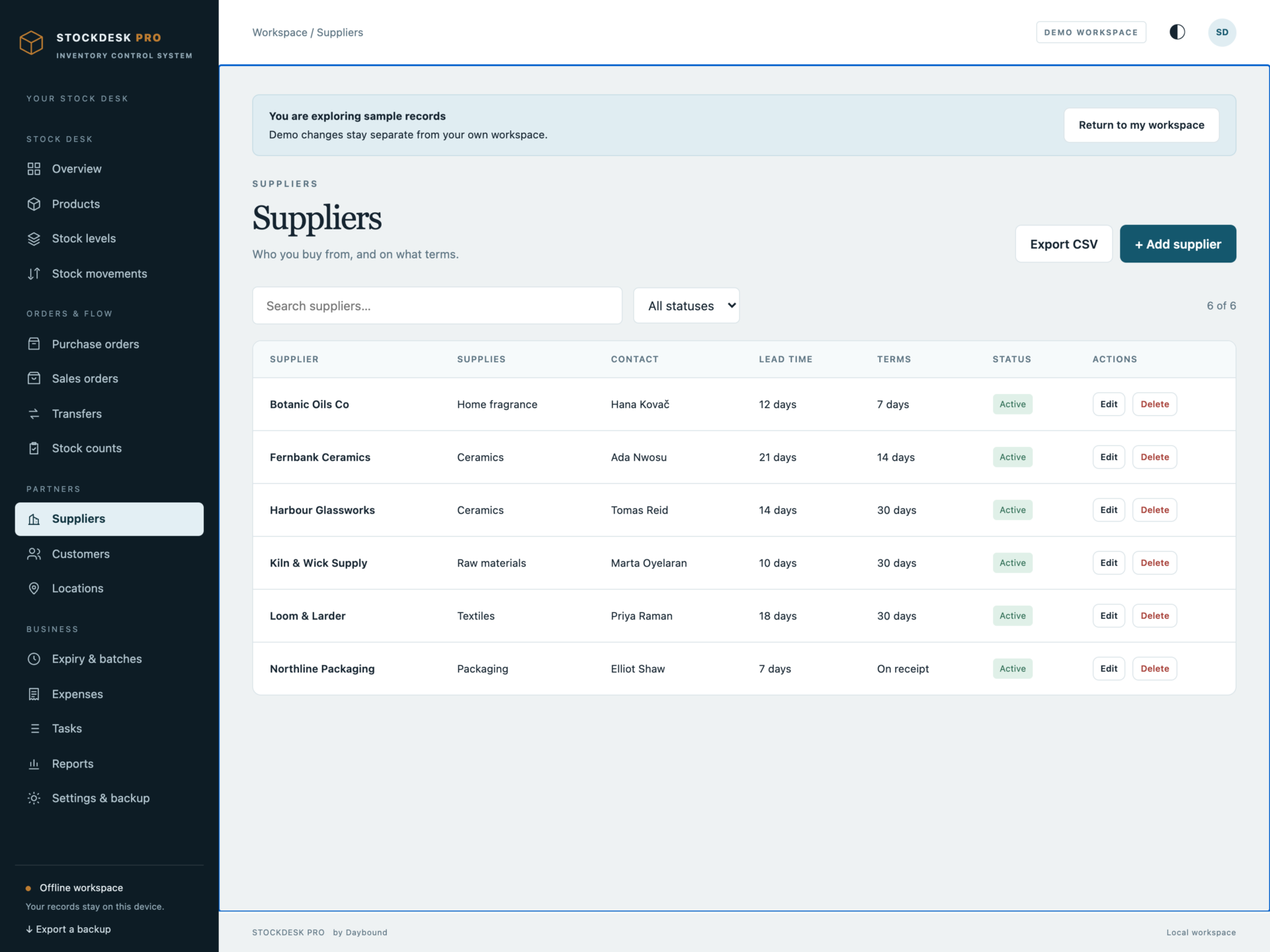
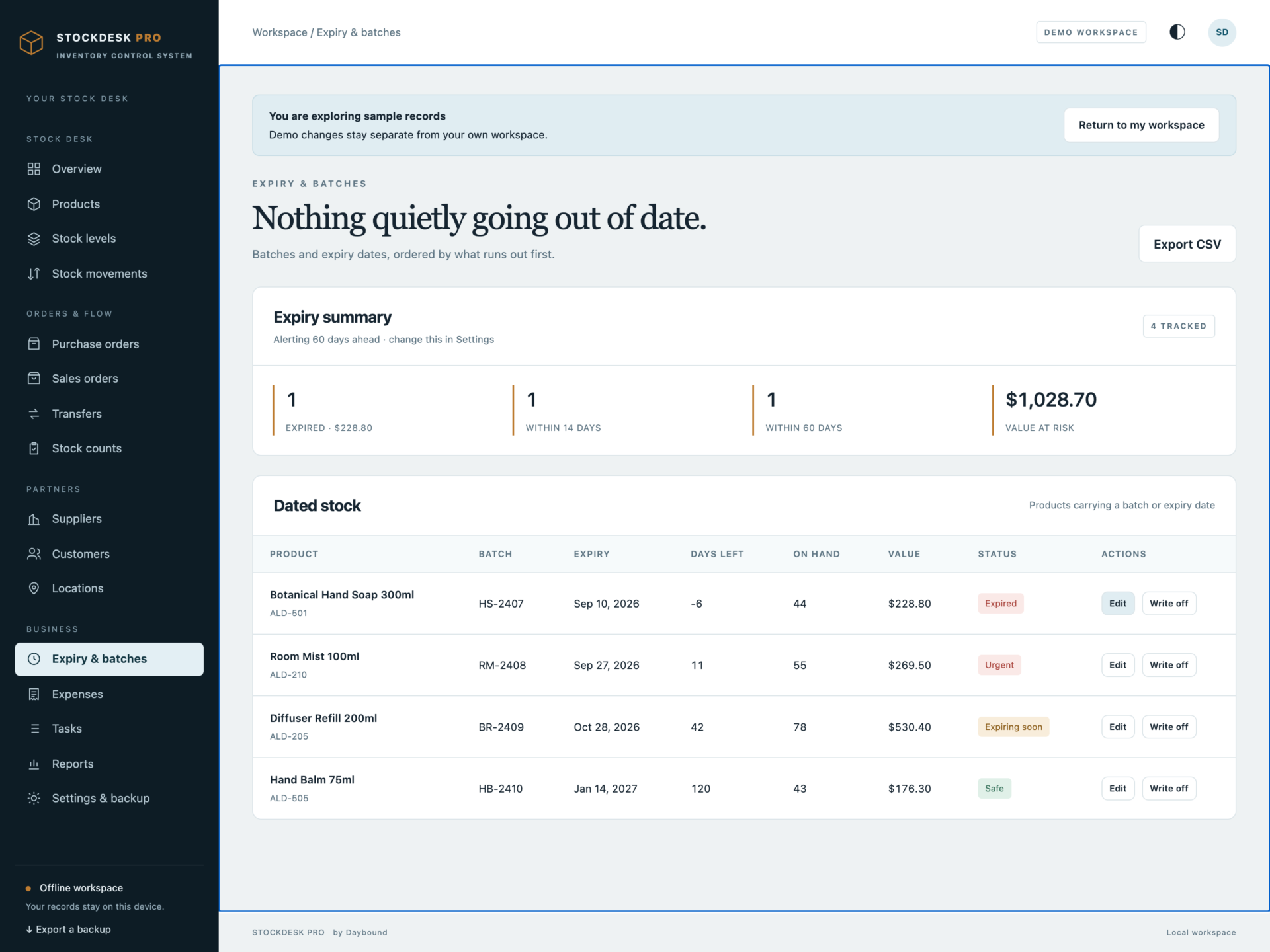
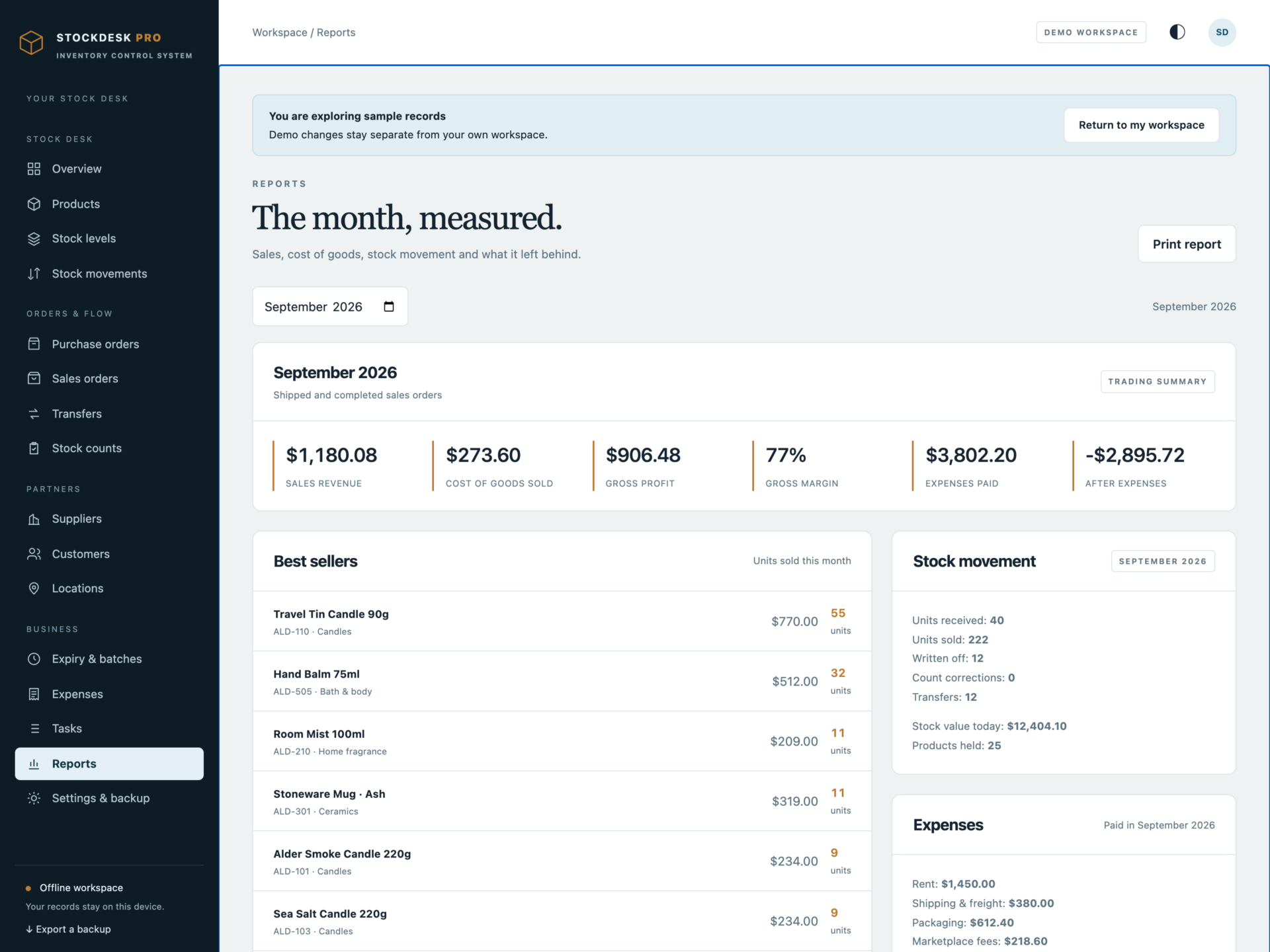
Batch and expiry tracking, ordered by what runs out first, with the value at risk and a one-click write-off. Suppliers with lead times, payment terms, minimum order and reliability. Customers with order history and total spend. Expenses by category, and a monthly report of revenue, cost of goods, gross profit, margin and best sellers.
Print what you need
Purchase orders, sales orders, stock count sheets, inventory valuation reports, reorder lists and monthly reports - and a barcode label sheet with real Code 39 barcodes drawn by the app, ready for your label printer.
Private by design
Records are stored by your browser on your own machine, not inside the HTML file and not on a server. Export a full JSON backup at any time, restore one after a validation check, or export any filtered list to CSV. A backup that would leave the ledger inconsistent is refused rather than loaded, so a damaged file cannot overwrite good records.
What you receive
- StockDesk Pro.html: the complete offline application.
- Getting Started.html: setup, stock ledger and backup guide.
- License.html: the included licence for use within one business.
Delivered together in one ZIP download. Screenshots and the walkthrough show sample records from the app’s demo.
Before you buy
Use a current browser with JavaScript and local storage enabled. A laptop or desktop is recommended for day-to-day stock work; a USB barcode scanner that types into the focused field works with the search box. This is a digital download; no physical item is shipped.
StockDesk Pro does not connect to Shopify, Etsy, Amazon, WooCommerce or any accounting system, does not process payments, does not email purchase orders, does not sync between devices and does not store product images or file attachments. Costing uses each product’s current unit cost rather than FIFO or weighted-average layers, and a product carries one batch and expiry reference rather than several live batches.
Frequently asked questions
Do I need an internet connection?
Only to download the file. After that it works completely offline - including from a USB stick.
Do I have to install anything or create an account?
No. Double-click the file and it opens in your normal browser.
Can I track stock in more than one place?
Yes. Every movement belongs to a location, so you can see what each warehouse, shop floor, stockroom or van holds, and move stock between them with a transfer.
How is this different from a spreadsheet?
A spreadsheet lets you type any number into a cell. Here, quantities come from a stock ledger: you receive, ship, transfer, adjust or count, and the on-hand figure follows. Stock cannot go negative, orders cannot be over-received, and counts post only the difference.
Does it connect to my online shop?
No. There is no integration with Shopify, Etsy, Amazon or WooCommerce. You record what you buy and sell, and the app keeps the stock, costs and profit figures.
Can it print barcode labels?
Yes. The label sheet draws real Code 39 barcodes from each product’s barcode reference or SKU, with name, category and price. Test one print with your scanner before a full batch.
Does it handle expiry dates?
Yes. Products can carry a batch reference and expiry date, and the expiry page orders them by what runs out first, with the value at risk and a write-off action.
Can I get my data out again?
Yes. Export a full JSON backup, or export any filtered list - products, movements, orders - as CSV for a spreadsheet.
Is it a subscription?
No. You pay once and the file is yours.
One-time purchase: $39, tax included. No recurring software subscription - the price you see is the price you pay.
At a glance
How it runs
-
1
Download
You get the application as one HTML file, with its documentation guide and its licence.
-
2
Open
Double-click it. It opens in the browser you already have - Chrome, Edge, Safari or Firefox. There is nothing to install and no account to create.
-
3
Keep
Your records save to that browser on that device. Export a backup from the app whenever you want a copy of your own.


